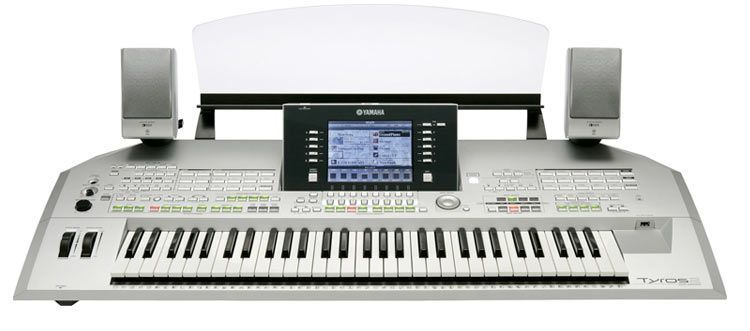
The Oberheim OB-12 is not exactly a hot new release. Even so, for the kind of player it was designed for, the passage of time is no reason to overlook it. Indeed, when we put together our first dossier on this type of keyboard emulating the analog synths of the seventies, we ran out of superlatives and praise for that machine and for the trends that had brought back the demand for those sweeping, evolving sounds. Now, judging by our first impressions of the OB-12, those adjectives are going to fall short sooner than we thought.
Without a doubt, today is our lucky day, because we finally get to see up close the much-praised potential of one of the most prestigious brands, though one that is little known to the general public in the synth world. Yes, the gadget coming out of its spotless white box is the Oberheim OB-12, a digital synthesizer that emulates analog sounds, or uses physical modeling, as some people like to call this type of keyboard.
Needless to say, we had been itching to get our hands on this impressive keyboard for more than two years. At the time we wanted to run a head-to-head with the one offered by another very well-known brand, but the OB-12 didn’t reach us in time. After all that, we hope it is not too late to give it the attention it surely deserves.
Its look is thoroughly “retro,” with a deep blue finish and (imitation) wood side panels, just as the book says it should be. This “little brother” of the prestigious synth maker that satisfied the most demanding players in the late ’60s and ’70s is now built by an Italian company that isn’t very well known among amateur musicians (Viscount). Perhaps in Spain the Oberheim name never had the same access to the general public as powerhouses like Korg, Yamaha or Roland, but the firm has always been respected for its great reputation, which is why we are overjoyed.
Once we finished setting up, our test table is presided over by a synthesizer that oozes the brand’s most classic sounds, emulated, of course. Before diving into the maelstrom of oscillator and filter types, we should say that the OB-12 is a 12-voice, multitimbral polyphonic synth with a 4-octave keyboard, enough for our purposes. We shouldn’t forget that the user of this type of keyboard wants to play experimental music based on “morphing” and sound-wave oscillations, which makes it a tricky choice for more standard compositions. To tell the truth, the OB-12 is not a keyboard for traditional songwriting, even though it contains more than 256 voices or sounds grouped in two banks. Without question, it is a synth with a capital S.
141 controls
Once we’re in the thick of it, we have to “wrestle” with endless knobs and controls, because the OB-12 has a whopping 141 controls that let us do whatever we want with the sounds. I can say this synth is well above what I expected, and the reason is the time I had to spend on this test, during which I was even able to patiently edit sounds that aren’t in the OB-12’s memory. That section is well worth the effort, but you have to be very clear about what you’re after. At first glance, the OB-12 is a very complex keyboard because of the number of controls and the variety of oscillators and filters it has, but it is a machine that will make hours feel like minutes, because you’ll be experimenting with variations without knowing which one to keep.
Its two sound oscillators stand out, separate and independent of each other, and you’ll spend great moments balancing the result or blending the waveform in three different ways: sawtooth, triangle or square. It also has two configurable filter types that lead into the amplifier control (we don’t mean the knobs on your guitar amp). Each of these sections has its own envelope generation resources. On the sound-generation side, we can keep gilding the lily with a ring modulator.
We can also explore sound modification with its two low-frequency oscillators and really get lost in the colors. It’s very dangerous to compose on headphones, because the sound quality of the OB-12 can leave you deaf. The bass is spectacular once we’ve settled on the right parameters for playing it. If you run it through external monitors, the windows in your room are in danger of shattering. If you do it through headphones, say goodbye to your eardrums.
Three ways to work
The OB-12’s keyboard has three modes: split, very useful for combining voices; “layer,” as if we were working in a sequencer with one voice per MIDI channel; and finally single mode.
As mentioned, the OB-12 handles its controls independently so you can double up the balance and personality of each oscillator. In every section you can warp, expand, extend and modify sequences to unexpected extremes. One example: on the oscillator closest to your left hand, the “wave ctrl” knob changes whichever waveform was last modified. If it’s a sawtooth, it varies the amount of distortion; if it’s a square wave, it changes the pulse width and so alters the harmonic spectrum. On the other oscillator, we were struck by its frequency modulation and the “range” and “fine” controls. With these, we can detune from a few cents up to two octaves. The ability to sync both oscillators stands out, as does the option to turn off keyboard tracking.
So as not to ramble, though the OB-12 gives plenty to ramble about, we’ll go on to describe, telegram-style, more details of its impressive architecture. In the center of the synth sits a generously sized, easy-to-read display. From here, or from your PC screen if you have the necessary drivers, you can access all the OB-12’s information and know at all times what you’re editing and the steps to follow so you don’t get too tangled up. If you’re in the middle of editing the EQ (which, by the way, is a five-band graphic), it will show you the curve it’s taking, along with the sustain or attack levels, and so on. Every instruction we give the keyboard from the display is so graphic that it makes the OB-12 very intuitive to use overall.
You also get an arpeggiator section worthy of mention. Your compositions gain presence if you combine in an effect (there are four, and they can be used together). You’ll spend a lot of time exploring the two filters the keyboard has (one per oscillator). Within them there are three types of slope with adjustable resonance and their own envelope. Through its three routing algorithms, we ended up with filters that have body, warmer and more soulful. After this long-winded explanation, words simply aren’t made to pin down exactly the idea we want to form of music: if you don’t understand a thing of what I just wrote, it’s better to use your ears. Words will be unnecessary. For the experts, I hope this humble translation has helped give you a rough idea of the potential of this machine.
We’ll wrap up by mentioning a pitch bend wheel, a modulation wheel and a ribbon controller for twisting the sounds until your ears hurt. There is a “shuttle” for quickly choosing and searching voices or, failing that, a telephone-style keypad to reach the exact voice once you know where it lives. On the rear panel, MIDI, auxiliary and headphone connections and so on are all present and accounted for. It even has a digital output and four pedal inputs. The power supply doesn’t use that annoying wall-wart transformer, which is a nice touch. By the way, the OB-12 measures 91 x 40 x 12 cms. and weighs about 12 kgs.
Conclusions
All in all, the OB-12 is a very functional keyboard that works for live performance, although I personally place it more in the studio, if the user is closer to session music. However, I disagree with some opinions that say this synth is ideal as a learning instrument. I consider it too complete to be a stepping-stone keyboard, given other competing products that, with more presence and grandeur, have left a lot to be desired. Besides, its price doesn’t suggest a tool you use and ditch after a few years. It isn’t the best of the line, but it would be unfair to call it an entry-level keyboard.
Also, as a postscript, library updates are available online, in case you don’t feel like spending your time creating your own sounds. We recommend downloading the editor, which is very good and lets you control all the synth’s parameters. It may be a bit slow, but everything will improve with time. That’s what we hope.