 If you weren’t yet familiar with any of the versions Steinberg has offered of its HALion product, you really are out of touch with CUBASE and NUENDO technology. Quite some time ago, the first version of this software (HALion) fell into my hands. It was, in essence, a convenient, advanced virtual sampler perfectly synchronized with Steinberg’s sequencers.
Many programs have come my way since then, for testing and for my personal use on sketches or demos. And none has been as useful and practical to me as this one. Virtual instruments have certainly developed by leaps and bounds, providing new tools, new formats and new ways of working. HALion, in my view, is software without too many complications or gimmicks, but effective at what you really expect to find in a virtual sampler.
Given the development I mentioned, the first versions of this software were indeed starting to look dated. Not for lack of bells and whistles, which I personally don’t miss, but because of the new extensions and formats, which really are an important step forward in handling loops and organizing our sampled audio.
What’s new
Nearly 50 new features ensure that HALion stays where it has always been: at the cutting edge of digital audio technology. This latest version expands its capabilities to new levels of accessibility and flexibility, creating a virtual sampler that not only inspires your creativity but also lets you work more productively and efficiently.
What’s new in HALion 3
- New file browser with drag-and-drop support, favorites, sound categorization and database indexing. It lets you group related sounds, making searching easier.
- New "Insert/Send Effects" sections. 27 effects. They can be applied to individual samples, groups of samples or entire programs. Effects can be sent to HALion’s internal FX section or even directly to the VST mixer to share plug-in resources between the host program and HALion.
- RAMSave™, a feature designed to manage RAM resources.
- Alternate modes: adds a wide range of functions, including playing a different sample with each new Note On message, introducing more spontaneity and feel, especially useful for realistic drum or string instrument sounds.
More file formats: adds support for Kurzweil and Kontakt sounds, as well as the Zero-X BeatCreator and Beatquizer Groove-Slice formats.
HALion 3.1 features
- Q-Controls: adds 8 macro controls for programs that can be assigned to almost any HALion parameter (including all FX parameters).
- "Advanced Stream mode"
- Includes the acclaimed HALion 3 sound library. Around 160 high-quality instruments.
- MIDI learn mode for learning MIDI CCs for all remote control parameters.
- Better support for all formats: VST, DXi, AU, ReWire (e.g. all Pro Tools versions) and standalone versions.
Features
- Files up to 32-bit, 384 kHz.
- 256 voices, e.g. several reloadable simultaneously.
- 16 multitimbral modes with an individual editor for program selection.
- 128 programs per instance, unlimited layers per program.
- Complete set of individual parameters for each sample, if required, ideal for drum sounds.
- Notch / High Pass / Low Pass / Band Pass 12 dB and 24 dB filters, as well as Waldorf sound filters and Fatness functions.
- 2 syncable envelopes with up to 32 freely editable points, intuitive handling.
- 32 levels as a source of free modulations and 2 LFOs that sync to the host application.
- Keyzone Editor for quickly mapping keyzones, samples, sample layers and velocity values, with drag-and-drop support and several mapping modes.
Ultra-flexible internal routing
- Up to 256 freely configurable outputs.
- 5.1 surround support.
- All-new real-time FX: Reverb, Phaser, Talkbox, Delays, EQs, BitCrusher, AutoWahWah, etc.
- Insert effects that can be applied to individual samples, sample groups or entire programs.
- Effects can be sent to HALion’s internal send effects or directly to the VST mixer through outputs configured for sharing plug-in resources between the host and HALion.
- Integrated Waveloop editor with crossfade, snap to zero, release loop and loop tuning settings,
- Total recall: all samples are saved together with the song.
- Sample-accurate timing and automation thanks to VST integration.
- Archive functions to transfer entire projects to other computers without any hassle.
- RAMSave™ technology optimizes RAM resources, for fast project loading and saving.
- Imports formats: AKAI, E-MU, Roland, Kurzweil, GIGA, Kontakt, EXS24, SF2, LM4, LM4 MkII, REX,
- Support for VST, DXi and AU formats
Graphic design
As for the look, it’s worth highlighting the improved on-screen content. Those of us who work with software appreciate the manufacturer’s effort to improve certain aspects, such as being able to see "at a glance" all the libraries loaded into the sampler through the macro window. Small details that speed up work and keep to a minimum the hours we have to spend switching from one window to another, since our intention (from start to finish) is to give free rein to our creativity without racking our brains looking for little buttons.
A quick tour of HALion’s windows
Macro
We start in the initial window, Macro, where we have information on the 16 channels. MIDI track assigned to each library, solo function for each track, library unload (reset) buttons, filter controls (cutoff, resonance and amount), amplification section (amount, volume and velocity), and editing of pitch, frequency, LFO1 and LFO2 parameters. It’s similar to previous versions but with substantial advantages over V1.0, as I mentioned.
From this section you have quick access to the global, keyzone, effects and sends, and quick adjustment controls.
Options
This window is similar to its predecessors, with a timely update. Here we control memory/voices, play/edit mode, sample quality, mono, stereo and 5.1 output configuration, and other parameters of interest for our setup.
Browser
An extremely practical window for exploring libraries. When you start working with a large volume of libraries, searching for sounds and organizing samples starts to get complicated. That’s when you appreciate a window like this for a quick check of your sources, analyzing libraries and the samples in each one. For example, in the typical case where you’re looking for a specific snare but can’t remember which library it’s in, the browser makes the task less tedious.
Sound
The Sound screen is the place for tweaking sounds, especially for those of you who like to customize every parameter, or simply the solution when something in your mix bothers you and you can’t fix it from the mixer. Perhaps a few tweaks here will get you to the exact spot.
Parameters such as DCF: Env. amount, cutoff, resonance. DCA: Env. amount, velocity, volume, pitch (in octaves and cents), mode; voice grouping, glide, etc.
Loop
As you all know by now, working with loops is carving out an important place in sequenced projects. The reason is simple: we save a lot of programming time, get excellent quality and "borrow" the feel of the artist who originally recorded it, taking their "groove" as a source of inspiration.
Well, at this point it’s important to highlight how far software (in general) has come in editing this type of file/sample. In the old days, we musicians had to adapt to the loop (something really annoying). Thanks to technological progress, the loops now adapt to us. In the Loop window you can manipulate them to fit your needs.
Keyzone
This is where you check and change the assignment of samples to keys (if a keyboard is your master instrument).
Global
Finally, we focus on this information summary. In Global, you can see at a glance the most important parameters of each of the 16 sample tracks generated by HALion.
Solo function, loaded library, assigned MIDI channel, pan, volume, transpose, curve, output (stereo, mono or 5.1), etc.
Effects
You can send effects directly from the virtual instrument. In the Macro window, you have the relevant buttons for assigning an effect (via the drop-down list of your plug-ins), as well as sending them to the corresponding outputs.
Personally, I prefer to handle all effects directly from the console (mixer), because if you start modifying, editing or adding from the virtual instruments, the mix becomes more of a hassle, since you’ll have to keep opening lots of windows to control them. Still, it’s there for you; perhaps you prefer to organize yourself differently, and what’s clear is that you can never have too many conveniences.
Our test bench
We had to carry out this test rather quickly, as we thought it would be interesting to include the product test for you, even though time was running out given the date.
Moreover, all software-based products have quite a few options and little buttons, which is why it would take a lot of space and time to cover absolutely everything. That’s what the manual is for, after all.
Installation is simple and quick. Everything works perfectly the first time. In our case, we had a small problem with the keys (those "cute" USB dongles that come with the software to deter pirates). On that note, I must confess that Adagio, and specifically their product manager for this area, gave us the solution right away, clearly and concisely.
To listen to the libraries and run the new program, we installed HALion 3.1 and HALion Player 3.1.
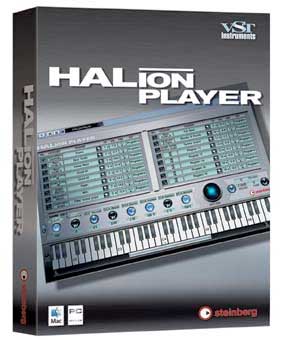
HALion Player 3.1
Tailored to newcomers to virtual sampling, HALion Player uses the new generation of technologies available in the HALion sampling platform. It’s the choice for any user looking for a stable, easy-to-use and affordable sample playback module for VST, DXi2, AU and ReWire environments.
It includes the complete HALion 3 sound library, consisting of an extensive selection of instrument sounds using the HALion 3 engine. HALion Player also offers Waldorf filters and disk streaming.
HALion Player features
- HALion 3 technology at an affordable price.
- Easy-to-use interface, even for beginners.
- Includes the complete HALion 3 sound library.
- Loads and plays back any HALion HSB, fxp and fxb content
- Q-Controls: 8.
- Remote control with all-new set & forget MIDI modes
- Sound category system support; finding, selecting and loading a sound are one and the same.
- 256 polyphonic voices and up to 256 audio outputs, 16 sounds and 16 simultaneous MIDI channels.
- Connects to everything: VST, DXi2, AU, ReWire and standalone.
Our HALion 3 test continues
After installing HALion Player, we opened Cubase SX3, creating a new project and opening the VST instruments. In parallel, we ran HALion Player to load the "packages/libraries," which can’t be loaded from HALion. We went through the whole arsenal of sounds and saved the ones that caught our attention most in a format loadable from HALion.
Plenty of sounds
I’d say you can find practically anything you’re looking for: acoustic basses, electric, slap, guitars (interesting performance effects in their libraries), strings, saxophones, pianos, effects and a very generous etc.
As for quality, I’d say it’s reasonably satisfactory. Some things sound better than others, but in general the sounds are powerful and plentiful.
Conclusion
When people ask me about the advantages of software over physical products, several factors always come to mind. One of them is the chance to access more sounds and possibilities for lower prices (than with physical units), and another advantage, as this new version of HALion makes clear, is that our setup is constantly updated.
Finally, I conclude that it remains one of the best virtual sampler programs for its balance of ease of use, sample quality, constant evolution and perfect synchronization with Cubase and Nuendo systems.