
The Pro Tools 2024.3 software update is now available and offers music and content creators powerful new ways to work with MIDI and audio, as well as seamless MIDI copy-and-paste functionality between Pro Tools and Sibelius.
Version 2024.3 also offers the ability to print and monitor live Dolby Atmos re-renders using Pro Tools' internal renderer, detachable Melodyne and clip effects tabs, improvements to Pro Tools Sketch, support for macOS Sonoma 14.3 and more.
Support for MIDI effects plugins
Pro Tools now supports MIDI effects plugins that let you quickly generate and manipulate MIDI to realize your musical ideas. From triggering multiple notes and modifying velocity and pitch to automatically generating musical riffs, rhythms and arpeggios, you can tweak and automate MIDI effects in real time.

MIDI copy/paste between Pro Tools and Sibelius
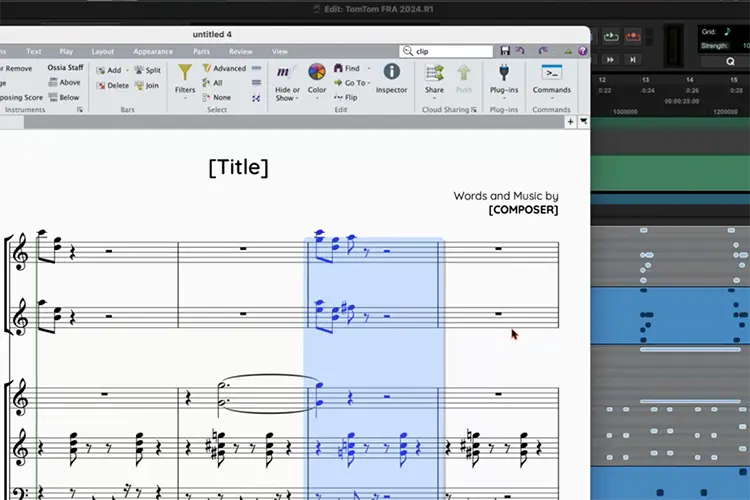
Pro Tools now offers seamless copying and pasting of MIDI to and from the Sibelius music notation application (version 2024.3 and later), saving composers days of work since they no longer need to build scores from scratch in parallel applications.
You can copy MIDI from Pro Tools to the public clipboard and then paste it into Sibelius with all the relevant MIDI information, including notes, pitch, note duration, timing/position in the clip and continuous controller data in the clip(s). Likewise, you can copy a selection of passages or an entire track in Sibelius with the relevant data and paste it directly into Pro Tools.
Custom live Dolby Atmos re-renders
Pro Tools 2023.12 introduced built-in rendering of a Dolby Atmos® mix. This was the first step in improving Dolby Atmos workflows within Pro Tools and laid the foundation for future improvements. Once it was released, the company kept a close eye on the user community to see whether the roadmap for future improvements aligned with users' priorities.
They already had many improvements in mind, but wanted to see what really stood out. Many of the users who were already using the Dolby Atmos Renderer application were taking advantage of its additional live re-renders to monitor and print stems back into Pro Tools. Although it was possible, the re-renders were not delay-compensated and had to be adjusted manually after a recording pass. While the Dolby Atmos renderer inside Pro Tools provided delay-compensated headphone and room re-renders, they didn't have the same flexibility (or number of simultaneous re-renders) as the Dolby Atmos Renderer application.
Pro Tools 2024.3 now provides custom live re-renders for binaural, 2.0, 5.1, 7.1, 5.1.2, 5.1.4 and 7.1.4 with Pro Tools Studio and Ultimate, as well as 9.1.6 with Ultimate. Not only can you create additional copies of the mix in different formats, but you can also use groups to render parts of the mix, such as music and effects. The only limit on the number of simultaneous live re-renders is processing power, and their performance has been heavily optimized to give you as many as your computer can handle.
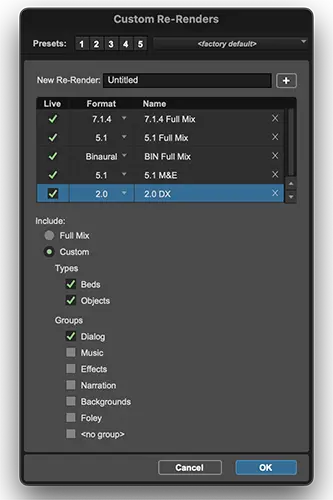 Custom live re-renders serve several purposes. You can use them to print delay-compensated stems directly into the session. This lets you independently monitor different configurations, apply limiting, easily review stems after recording, and quickly export the stems as files when you finish the mix.
Custom live re-renders also make it easier to monitor your mix using Apple Spatial Audio. Audiomovers and Embody have both created plugins for monitoring Apple Spatial Audio that can be placed on a track fed by a 7.1.4 re-render.
The default headphone and room re-renders, introduced when the internal Dolby Atmos renderer integration was launched, are still available but behave somewhat differently from custom re-renders.
Default re-renders
- - They only allow one re-render of the full mix and support specific formats. Room: 5.1 and 2.0 / headphones: 2.0 and binaural
- - They follow the Pro Tools hardware buffer size, allowing lower-latency monitoring if needed. As a result, binaural processing is only available at higher buffer sizes.
- - They follow the mutes in the Dolby Atmos renderer window.
- - They can't be bounced.
Custom re-renders
- - They support the same formats as the internal Dolby Atmos renderer.
- - They don't follow the Pro Tools hardware buffer size setting: they always run at the highest possible buffer size for the best performance, but can't be used for lower-latency monitoring. This also means binaural processing is available regardless of the hardware buffer size setting.
- - They don't follow the mutes in the Dolby Atmos renderer window.
- - They can be bounced from the Bounce Mix window.
Avid will continue to monitor feedback on the Dolby Atmos integration and work with Dolby to deliver more improvements over time. Custom re-renders are just the first incremental step, and they are very excited about what the future will bring.
Aside from re-renders, some other Dolby Atmos improvements in 2024.3 include:
- - Custom bed subpaths: beds in the Dolby Atmos tab can now have custom subpaths. This offers more flexibility and better compatibility with older Pro Tools sessions that used Dolby Atmos.
- - Additional ADM metadata: additional information about the ADM BWF WAV file is displayed in the Import Session Data window.
- - Easier ADM import: Pro Tools will now reuse any compatible paths when importing an ADM BWF WAV file. This reduces the amount of I/O setup required.
- - The Dolby Atmos renderer window is now translated into the supported languages.
Pro Tools Sketch improvements
2024.3 also offers several improvements to the Sketch window and the free iPad app, including:
New features for the Sketch window
- - Improved drag and drop between the Sketch window and the Pro Tools Edit window, including mixer settings when dragging from Sketch to Pro Tools and rendering MIDI as audio from Pro Tools to a Sketch audio track.
- - Automatic anchoring of a Sketch document when it is saved in a Pro Tools session folder.
New features for the Sketch iPad app
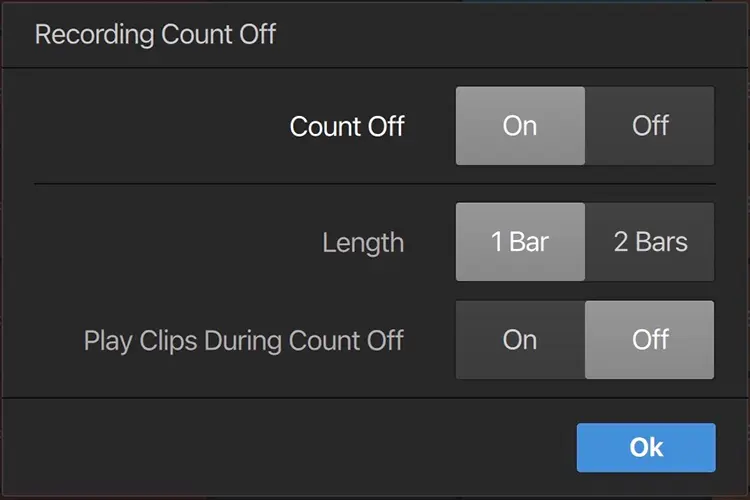
- - A count-in when recording audio and MIDI clips simplifies recording and minimizes performance editing.
 |
 |
Detachable Melodyne and clip effects tabs
The Pro Tools Edit window has tabs for working with MIDI, ARA plugins and clip effects. Now you can detach the Melodyne and clip effects tabs as separate windows to better organize your workspace according to your preferred workflow.
You can detach both the clip effects tab and the Melodyne tab and move them independently of each other, put the windows in full-screen mode or even move them to another display.
Support for macOS Sonoma 14.3
Pro Tools 2024.3 is qualified for macOS 14.3, resulting in significant performance improvements using efficiency cores on M1, M2 and M3 systems.
The video engine can stay disabled
Pro Tools will no longer require the video engine to be enabled when opening a session that contains video content. This lets the system save resources when there's no need to display the picture.
Pro Tools 2024.3 is now available to all Pro Tools customers with an active subscription or a license that includes a current Upgrade Plan, as well as to all Pro Tools Intro users.


