 BITWIG STUDIO 2 is a new music production system available for Windows, Mac and Linux. Version 2 comes loaded with new features. It was the first music production software to combine linear and nonlinear sequencing on Windows, Mac and Linux, with cutting-edge technologies such as plug-in crash protection and an adaptive user interface, along with a fast workflow experience for keyboard, mouse and touch screens.
A reconceptualized modulation system with 25 new modulators
Numerous updates including remote controls, dynamic displays and spectrum analyzers
17 brand-new devices
Better hardware integration with improved MIDI handling
Crossfades
VST3 support
Launched in 2014, BITWIG STUDIO was the first music production software to combine linear and nonlinear sequencing on Windows, Mac and Linux, with cutting-edge technologies such as plug-in crash protection and a highly adaptive user interface, along with a lightning-fast workflow experience for keyboard, mouse and touch screens.
Despite tough competition, the software has attracted a good number of users around the world since its launch. Now, version 2 offers a full set of powerful features for them and for everyone joining this DAW from now on.
MIDI clock slave
BITWIG STUDIO 2 can sync to hardware and software clocks.
New audio effect
An amp simulator: the amp consists of pre and post sections with individual EQs, a drive section with 8 types and an external cabinet simulation that offers coloring and mix settings.
New sound pack: IRRUPT EURORACK
A sound pack created by Irrupt that showcases how easy and accessible the BITWIG STUDIO 2 workflow is. Modular-inspired sounds including a rich variety of bass and melodic loops, plus 5 drum kits.
New sound modulators
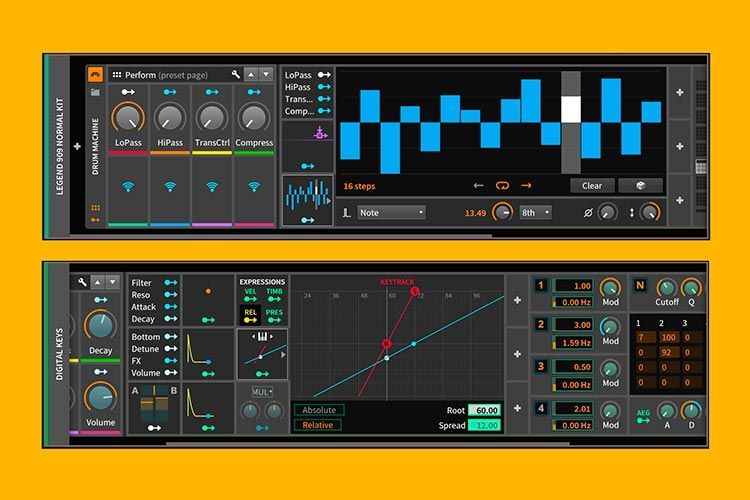
Version 2 of the software has reworked the entire modulation system, which now offers endless possibilities. This is a big step toward creating a fully modular device. Each device has modulation slots for loading individual modulators. It features 24 new modulators, from standard ones such as envelopes and LFOs to more special ones such as Random, Select 4 and Math. An unlimited number of modulators can be added to a device. A modulator can also be easily assigned to any number of parameters. They can also be interconnected to offer very dynamic and expressive sound design possibilities.
In addition, when using internal Bitwig instruments, many modulators can be set to polyphonic mode, allowing per-voice modulation.
New devices
In addition to completely reconceptualizing the modulation system and introducing a new class of modulator devices, the collection of standard devices has also been expanded, for example with the Spectrum Analyzer, a very useful tool for producers that offers a visual representation of audio material. The new spectrum analyzer allows a freely selectable sidechain input to directly compare the frequency graphs of two independent audio sources.
Better hardware integration
MIDI handling has been greatly improved, with better timing and note synchronization. A set of devices has also been introduced that allows hardware machines to be seamlessly integrated into the workflow via MIDI and CV/Gate.
Device updates
Improvements have been made to the devices, enhancing sound quality and ease of use. Several devices now include a spectrum analyzer and dynamic displays. Many devices have been redesigned and reorganized to add new functions. BITWIG STUDIO 2 also improves the display of parameters, motion and signal flow.
Fades and crossfades
Fades and crossfades with a much faster workflow. Fades and crossfades can be created in the timeline or directly in the audio editor. Fades can be created for audio events from the clips, for quick and easy editing. Naturally, the curve of every fade can be adjusted. You can also freely adjust the height of individual tracks in the timeline.
Smart tools
VST3 SUPPORT, including per-note expression and sample-accurate automation. It also features smart tools. Many standard tasks can now be performed without switching tools. In addition, the detail editor now has its own tool selection.
The dashboard
The dashboard handles many tasks that were previously available only in menus or windows, such as finding and opening projects, configuring settings or accessing help resources. The dashboard has a more sophisticated, user-friendly approach, shaped by a more modern software design. In addition, we have consolidated most configuration settings and placed them in the Settings tab of the dashboard.
BITWIG STUDIO 2 also introduces a new notification system that displays different types of messages in a clear, simple and unobtrusive format. The menu system has also been improved. Bitwig Studio 2 shows different menus and new options. To speed up the workflow even further, you can memorize your actions so they are always visible in the menu bar. The manufacturer has worked on all the context menus to provide faster, more intuitive access.
|
BITWIG STUDIO 2 PRICE: 399 USD / 379 EUR |
Upgrade from version 1 PRICE: 169 USD / 159 EUR |


