
I have always, absolutely always, believed that the sound engineer is, and must be, an active part of the band they work with, being the last "human" (or subjective, if you prefer) element that handles and processes the audio signals coming from a stage. Their job often consists not only of delivering a coherent final mix but also a perfect, controlled piece of artistic work. A result that isn't achieved overnight, but is the fruit of day-to-day work, driven by the constant spirit of self-improvement that pushes our daily work. And this is where, for me at least, the need comes in to review, study and improve on what we did at the previous gig. That way, whenever someone asks me what my best gig was, I should be able to say flatly: "the last one." Always.
To begin with, as part of this working method I usually record my bands' concerts. Years ago I did it on cassette tapes, then on MiniDisc, with the occasional foray into solid-state memory and now, of course, using a laptop. But the main difference isn't the type of technology used but the method applied: moving from plain old stereo recording to multichannel.
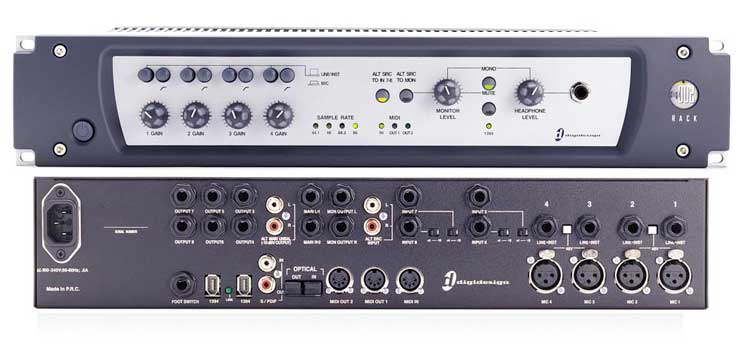
Obviously, it's a working recording, never for professional release, since in that case not only would better gear be used, but a completely different procedure. With that in mind, for some time now I've been using a Digi 002, taking advantage of its eight input channels (four mic or line, the other four line only) to record concerts.
I chose a Digi 002 for reasons as simple as the fact that the brand, Digidesign, inspires my complete and absolute trust. As for the computer, in my case I use Apple's most basic iBook G4, the 12" model, which at the time cost barely €1,000. Let me tell you up front that I will never blame the problems (and there are some) on the gear, since to this day my computer has never frozen, the interface has never stopped and I've never had any computer problem whatsoever (perhaps the absence of Windows helps).
The change from stereo to eight-track multichannel recording is impressive. So much so that some songs recorded purely for internal purposes have ended up being played on various radio stations or becoming fodder for fan groups
. Of course, there's a trick to it: those songs later went through a long studio session. We'll get to that later.
Preparation
A conventional modern pop-rock band usually uses an average of 20 channels from the stage: up to ten for the drums, another two for the bass, let's say two electric guitars, an electric and/or acoustic keyboard and the vocals (including the lead). Obviously we'll have to prepare something to fit them into just eight recording channels. It all depends on what the later work requires, but what I usually do is record groups. For example, I could rule out recording in stereo and "virtually" gain twice as many channels. The clearest example is the keyboard: I can sum the keyboard's two independent channels into a single one (taking care that there are no phase/polarity problems). The bass's two sources could simply go to the DI box, forgetting about the mic we placed on the amp. But even so, it doesn't come out to just eight channels.
Depending on the kind of venue where the concert takes place, we can already predict what final recorded sound we'll get. In small, very small spaces, we probably won't do a live mix of all the instruments. Normally we'll start from the volume level of the loudest one and bring the rest close to that "unamplified" point, keeping a manageable, comfortable sound pressure level. That's exactly why many recordings (made straight from the desk's LR output) sound awful at home. But it's easy to see that, even in these difficult situations, the drums and bass usually share the same sound stage, so to speak. If we group all the drum channels and the bass channel into just one pair, we reduce the number of channels needed from 12 to just two.
On another channel, the third, we can put the rhythm guitar, and on the fourth the lead. We'll devote another channel exclusively to the lead vocal, which leaves us three. At this point we have to be critical and decisive. We need to ask ourselves what we'll want to isolate in the future, or even what final sound quality we want. In our hypothetical case, we can use one channel for the keyboard (which will go from stereo to mono) and another for the backing vocals in stereo (keeping their placement on stage). Or vice versa. Obviously, a band that adds just one more instrument will blow the previous plan to pieces.
There are tricks you learn day to day. Sticking with the previous example, we still have three "free" channels. If we leave one for the keyboard and another for the backing vocals, we can use the third free one for other purposes, for example: separating the bass from the drums, recording the reverb tails and other effects (not to be underestimated, as we'll see later), separating the clean channel and the amp channel of the main electric guitar, etc.
At FOH
Taking the 002 as an example, it includes eight jack inputs and four mic inputs via XLR. Only the four switchable between line and mic have their own preamp level. Channels five through eight are fixed. We'll need to have enough suitable cabling ready for the connections, something I won't cover in this article.
What matters most is knowing what kind of desk I have and what options I have for "getting signal out." If it were the recording of a professional concert, I would obviously use a signal splitter, completely separating the signals going to FOH from the ones I'd record to the hard drive for later processing. I would use my own preamps and would, in fact, be completely independent of whatever the FOH engineer did. I could even use, if necessary, different microphones better suited to recording than to live sound (for example, an acoustic piano with more sensitive mics, which live would be a problem for the monitor engineer). But I insist that's not the purpose of these pages. The person recording the concert to eight tracks is the same engineer who, during the concert, will have more than enough work without also keeping track of how and what is being recorded in real time. So it will be enough to pay attention to what we do next.
In record time (we're paid to do the sound, not to record), we'll have to solve one question: Where do I connect?
In our example there are four direct channels: the two guitars, the lead vocal and the effects. We only have the Digi 002 and cables. Many desks include an output on their channel connection panel, usually labeled "direct." This is usually the desk's signal for that channel, specifically right after the gain stage. Others include the EQ, others also the inserts, others make the output level depend on the channel fader... But the interesting thing to know is that if we keep the gain level under control during the show, we'll also have it under control during the recording. The channel level meters should read the same as in Pro Tools.
Another option is to use a Y-cable, which, besides slightly reducing the effective voltage level, will send the same "clean" signal to both the desk and the sound card. On the one hand, it's a very good option, since we avoid running the signal through two preamps; on the other hand, we'll have to keep an eye on the computer screen to see whether the level has "grown" a lot since the start of the concert. This often happens, for example, with electric guitarists who, carried away mid-show, always end up cranking it up more. You know that too much gain translates into distortion.
How do we group the rest? The easy answer is to think of subgroups or VCAs. It's easy to find dedicated outputs for those channels. But the drawback is still the level differences between the start of the concert and its peak. Nobody in their right mind will turn down the drums just because they're seeing little red lights on the Pro Tools screen. What we can do is work with any free auxes we have or with the rarely used Matrix outputs. They're more effective, since they let us independently control the output level of each group, or even keep a constant level independent of what we do at FOH. What's more, we're not forced to use the subgroups or VCAs according to what we want to record: we split the control desk's functions in two.
Of course, all this depends largely on the desk we're using.
Recording
Advanced Pro Tools techniques aside, we know the software and hardware have limitations. Simultaneously recording eight channels is no easy task, especially for a G4 laptop. Although I've never run into unsolvable problems, it's also true that I've avoided looking for them. Even so, I've occasionally pushed them to the limit by adding a real-time compressor to some channels. I do this when I'm convinced there will be some mismatch in levels. But each inserted compressor asks more of the computer. Considering it's a 002 (now discontinued in favor of the 003), I can only applaud.
After the concert
A piece of advice: never, absolutely never, let the musicians listen to the recording without first being sure they can. Jokes aside, there are things we need to keep in mind. Even if we listen back to the multitrack recording made following the previous scheme, we'll realize we probably haven't "recorded" the mix, which is one of the most important parts of the work we're paid for. We'll have untreated vocals that sound very loud and nasal, rhythm guitars up front, leads in the background, harsh keyboards… There's work to be done, but rewarding work. We'll see it now.
I usually "edit" the recorded concerts as if they were a live show. Once I've checked that everything was recorded properly, I apply the EQ and dynamics processing needed for the project to take shape. Then, if everything was recorded "flat" (that is, PRE-fader style), I listen to the concert again while controlling the levels in real time. Remember, this is "working audio."
Once it's more or less edited, I can play it back with certain advantages. For example, I can discuss with the artist or musical director the effects I added to the vocals or other instruments. That's why I devoted a track to them. With the right real-time inserts, we can even "play around" looking for new effects or more precise settings for upcoming concerts.
We can mute one of the guitars to find out whether one player's and/or the other's chords are correct. The guitarist can improve his performance by getting a copy of the last concert without his guitar. Even the singer can have his own karaoke.
The advantage of a leader
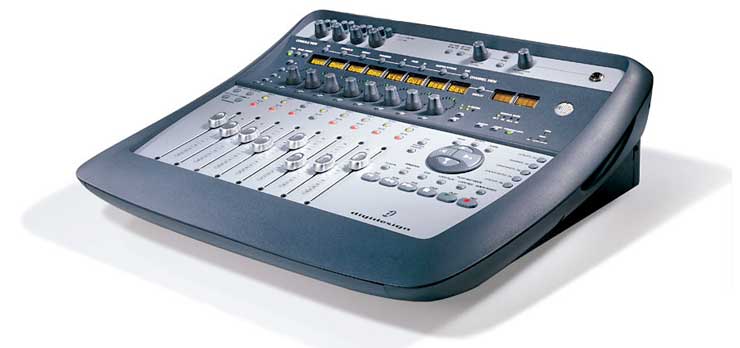
Now let me do a little advertising, if you'll allow me. I chose a 002 for its features and familiarity with Pro Tools (although I use the LE version, I can take those files to almost any professional studio in the world and work with them without conversions or problems). But there is a console called the Digidesign VENUE. This desk was conceived to bring Pro Tools technology to the live world, to the point that it is fully compatible with a multichannel HD system. This means that with a well-configured VENUE we'll have an exact, identical copy of what we mixed live. Point by point. And we'll even be able to listen to the last show once or a thousand times, refining every aspect of the work at FOH. Without limitations. Don't tell me now that you wouldn't like to have one.


