
Through computers we now have access to music editing programs as powerful as CUBASE, but many people tire of depending so much on the mouse to run it, when it seems simpler to do so with “physical controls,” like “the good old ones...” Yamaha offers an excellent solution to those who think this way, even “proving them right,” with its N8 and N12 products.
What Can Be So New at This Point?
These new Yamaha developments aim to make our work as musicians and, at the same time, as “self-engineers” easier, in a more logical and effective way, while also boosting our recording setup to VERY PROFESSIONAL levels in quality and technical capabilities.
These new products are much more than a mixing console, since they work together with their own circuitry, plus that coming from a computer program to which they're linked by a cable plugged into a computer, forming a fabulous working tandem with a multitude of tracks, both audio and MIDI, and every kind of effect, and not just compressors, limiters, reverbs, and so on, since these machines bring their own effective solutions, for example in EQ, sends, and above all in the inputs for signals from several microphones or several musical instruments, which can be recorded simultaneously through this system in the most professional way there is. Even the signal inputs where we plug in the desired instruments or microphones contain, if we need it, individual “Phantom” power (an extra 48-volt direct current required only by the most professional devices, which in this way power their own circuits, which in turn contain their special internal amplification).
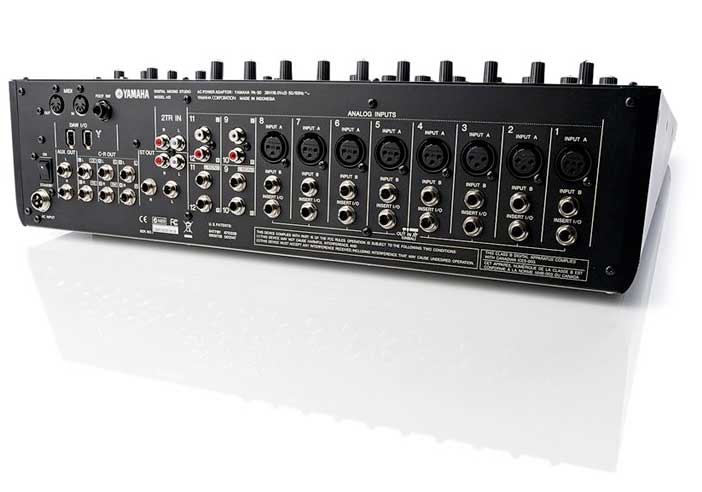
This prolific, professional type of simultaneous connections, which in practice usually turn out to be needed (when recording several musicians at once, or just one but with many microphones at the same time, for example on percussion), is generally not provided for by any computer, which at most have just two inputs, unless that computer already has a very special, sophisticated internal sound card installed. And even with that kind of card, it can't handle as many physical controls as these Yamaha proposals do, which let you work with any type of sound card installed in your computer, as long as it conforms, for example, to the ASIO system (very common among computers) and has the lowest latency possible.
As always, this business of better latency, a faster processor, comfortable RAM (preferably 2 GB or more), and so on, comes down to “bucks”...
Latency is the period of time that elapses from when we execute a command, for example when sending our computer the information about a desired musical note to be recorded by the installed program, until the moment the computer responds to that command after processing it. That period, which is unavoidable, can be cut down to just a few thousandths of a second, depending on the components installed in the computer. In any case, these YAMAHA devices will accept whatever card we've chosen to have, although, naturally, everything will always turn out better at the end of the process when we have the best possible “raw material.”
Analog and Digital at the Same Time?
Of course, these control surfaces aren't forced to be linked through a computer; they can operate independently with or without one, or with both systems working at the same time. They are therefore extremely versatile and very useful, since we can use them on any occasion, both on stage and in a recording studio, without taking up too much space, but with far more tools than they appear to have, especially added in nearly endless options when linked to specific computer programs.
Yamaha directs its efforts, especially with these new products, toward getting the best use out of these consoles when that music software is the well-known and extraordinary CUBASE. Many of us have been using this program since the 1970s, when it was called Qbase, and it has improved through successive periodic versions as computing and its new, grand possibilities, which we all know how to appreciate, have also advanced. CUBASE has also held up very well against fierce competition and, while other similar programs “threw in the towel” and dropped out of that crazy race of improvements, CUBASE has been pushed to limits far beyond professional, since this is undoubtedly the preferred program for those of us who use a PC (perhaps not so much for those who use a Mac) and, at least in Spain, the number of PCs in use is overwhelmingly dominant, among musicians too. Nevertheless, these Yamaha consoles are ready to be used interchangeably on both PC and Mac computers.
Cubase, now in version 4, is packed with plug-ins and sophisticated tools for improving sounds, an enormous number of audio, MIDI, and even video tracks, all able to work simultaneously. The software Yamaha supplies for digitally controlling these consoles contains an AI4 version of CUBASE, fully compatible with both systems, Windows and Macintosh. Installing it on our computer will require at least 400 MB of hard drive space. This version offers up to 48 audio tracks and 64 MIDI tracks working simultaneously, an enormous number of virtual effects, and even its own virtual sounds, samples from the famous “Halion One,” as well as others from the new “MOTIF,” which impress with their realistic quality in many of their typical “natural” or “acoustic” instruments, such as sax, flute, violin, and so on.
But CUBASE itself contains so many tools that using and controlling it becomes overwhelming, especially if we try to do so with just a small mouse and one hand, having to jump constantly from screen to screen on our computer and wearing out our concentrated eyes. Sometimes this is necessary, for example, just to move a reverb effect by one notch, a sound's pan position, a level correction on each track, or the many other options we'll constantly want to tweak. It ends up being tedious and tiresome to place the pointer on our screen with such precision.
N12 and N8: Yamaha's Two Offerings
Both are very similar, differing mainly in size and the number of channels they handle simultaneously; internally, however, their machinery is similar in features, and they even use the same software and applications.
YAMAHA N12
Twelve is the number of possible simultaneous signal inputs, of which eight can accept either XLR connections (each with its Phantom option) or the typical ¼" jacks (common on electric guitars). It also has stereo final outputs for both types of connections, which covers any professional situation.
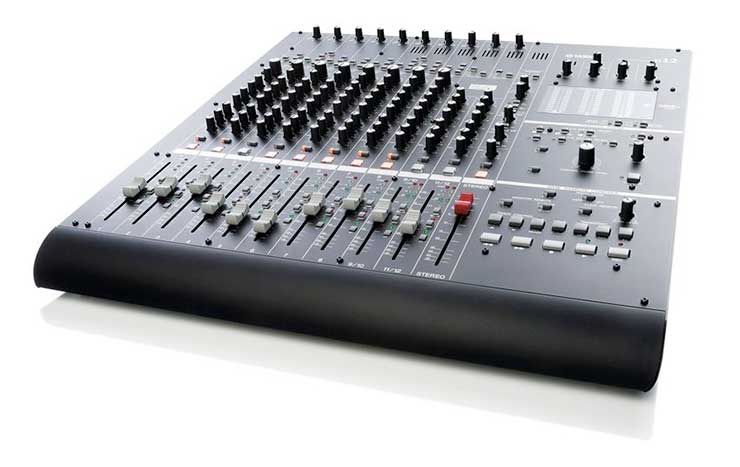
Each channel incorporates independent controls to precisely adjust the impedance of the instrument or microphone plugged in there, using a dedicated knob, as well as the individual application, if desired, of the aforementioned Phantom power.
Next, each channel contains an effective “Morphing” compressor with “Sweet Spots” (precision sweet points) which, through an individual lighted indicator on each channel, shows its effectiveness (in addition to the sound it delivers when it acts). This compression, for each microphone or instrument signal hooked up to each channel, gives it a special sonic “color” and better “body” and “brightness,” as prominently as we like.
In the processing of each channel, the sound continues through its corresponding four-band equalizer, highly professional and effective, with very exact adjustment to our requirements. Next, we set the amount of reverb we want to assign to each channel, independently, bearing in mind that the type of reverb applicable here can come in almost endless styles, especially when we work digitally, and instead of reverb we can even apply other very particular and very different kinds of effects from among a great many to choose from. We also have an individual output control from each channel, to route it to the console's main output, to some kind of external monitors (which will handle different mixed volume levels relative to what we also have at the main output), or to send them to a recording system with identical particulars, but which we'll undoubtedly want to be different from what's happening in the listening room.
Each channel also has a “pan” control, which sends that channel's specific signal to the left or right of the stereo field in the final mix, and to whatever point in that pan we like.
Likewise, we can mute each channel or control it quickly and individually, muting the rest of the channels, with just the press of a single button.
The faders (volume controls or vertical sliding potentiometers located at the end of each channel) are extremely smooth to the touch, and add an independent LED warning us of possible saturation or distortion (a different LED from the one at each channel's input, where we adjusted the sensitivity or impedance of the incoming signal). This LED, next to the faders, doesn't usually appear on consoles of the same type and, of course, such control is welcome, for example to quickly head off an untimely, unpleasant feedback. Likewise, next to each fader there are three other buttons that will be very useful when we work in conjunction with CUBASE, for example when specifically assigning which channels we want recorded and which only to listen to in playback mode.
The N8 model has eight inputs instead of 12 (which the N12 has) and four XLR inputs instead of eight, as well as six ¼" jack inputs instead of eight.
Both have similar tools, even at the already mixed output from the console, for example with RCA connections, as well as XLR (professional CANON) type.
Both models also have two independent outputs for two pairs of headphones, so two people can work on the same controls at the same time, for different or identical purposes.
Using switches on the right side, each console can immediately be turned into a MIXING CONSOLE (rather than a signal-input console), picking up in detail the information coming from the computer and thus configuring the overall stereo output to our convenience, in a far more comfortable way than if we did it only with the tools offered by the software, such as the mouse or the computer keyboard.
Some Specifications and Prices
They have an impressive, very professional semi-matte black finish. Their white screen-printed lettering is impeccable and very easy to read. The N12 launched at a price of 1,499 € and the N8 console at 1,089 €
Buying one or the other will depend more on how we want to work with respect to the number of possible inputs in each case, since the rest of their features are quite similar.
The N12 allows monitoring in 5.1, and both have DAW transport control.
They work with high dynamic range, selectable from several modes, especially when we make the final recordings digitally. In analog, for signals with a dynamic range of 114 dB from 20 Hz to 20 kHz. Their signal-to-noise ratio is quantified at –128 dB, which in analog would amount to about –95 dB at the final stereo output (high quality).
The N12 consumes only 51 W (33 W for the N8). Their respective total weights are 14 and 11 kg; their dimensions in each model: 146x561x515 mm and 146x518x360 mm.
They come with a power adapter (AC to DC), cables, software, and instructions.
With these machines it's as if we extended our hands into CUBASE, achieving in a very intuitive, comfortable, and effective way faster, more professional work in any situation, in front of an audience or in an immense, well-balanced recording studio.


