
Steinberg CI1 and CI2+ interfaces. Control Cubase without a mouse. Ever since Steinberg partnered with YAMAHA, CUBASE has been enormously strengthened, and for many it is one of the best sequencing programs available to install on our home (and professional) computers.
Now, Much Easier to Operate
Thanks to these controllers made by YAMAHA in Japan, which contain the essentials for plugging in our musical instruments or microphones, we don’t have to look for those kinds of connections on the sound card installed in the computer. And it is taken for granted that CUBASE will already be loaded on that computer, linked to some of the interfaces like those presented here via a simple USB connection.
These units, very small in size (little more than what a desk phone would take up), can also include other important devices to control the program’s essentials without having to use the mouse on screen, although both will work in sync.
Now that we all need space, instead of having a more or less bulky mixing console for such functions—which until recently almost everybody did, with each channel’s controls repeated in several rows (volume pots and the various effects we want for each of those channels)—someone has cleverly thought of simplifying it with this type of add-on. That is, it’s as if all those controls had been placed on these little machines, but “for a single channel,” and then, with a switch, we can hop from channel to channel, so that each of those channels can hold different settings. At the same time, we can see all those processes on our computer screen in a continuous, intelligent and logical way.
Without a doubt it is a way of simplifying recording for musicians or anyone who wants professional-level results at an astonishingly low cost. With these elements, we will turn our computer into a very powerful recording studio that will generate professional productions and even very high-end final masters.
Minimum Computer Requirements
Automatically, when installing CUBASE, the program itself searches for and finds all the resources we have, and even with the bare minimum of those elements installed, it is able to adapt and run. However, it is recommended to have some minimum operating specs, which is not much of a problem nowadays, since they aren’t as expensive to get as they used to be.
The program will run more comfortably when we have a better machine to support it, and also depending on its latency (those microseconds the computer takes to react to our commands). If we have a Mac, we should use compatible operating systems such as MAC OS X 10.5.5 or 10.6 and at least 1024 MB of RAM, 1 GB of hard drive space, a USB port and Internet access. For a PC, the system is compatible with Windows XP, Vista and 7. It would work with 1024 MB of RAM, but it is recommended to exceed at least 2 GB of RAM and, if possible, to use a dual-core or better processor, although it also works with the old single-core ones. Likewise, it should have a USB connection and Internet access (quite common nowadays).
It can run on both 32-bit and 64-bit systems. The program itself will adapt. Obviously, “the more firewood, the better it burns.” As we know: better performance, a bit more budget. What gets used a lot isn’t expensive (that’s my theory), and vice versa: what seems cheap, if we never use it, is really expensive. So it’s up to each person to decide which formula to apply. On both types of computers, it works with resolutions of up to 24 bits and sample rates of up to 48 kHz, that is, with high-end professional sound.
Different Models
About two years ago, a model similar to these two came out, called the CI2, which I also reviewed. At that time, this type of tool was a huge first (and not only on Steinberg’s part, because other manufacturers tried to launch similar products for use with other programs).
"Both are USB bus-powered"
Now Steinberg-Yamaha has just launched these two new models, which have some differences in their tools as well as in their price: the CI1 costs only about €119, while the other model, the CI2+, comes in at about €339.
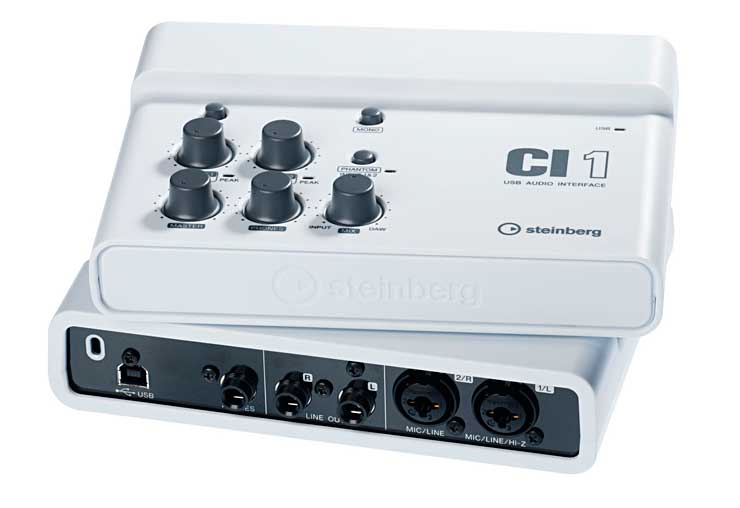
CI1
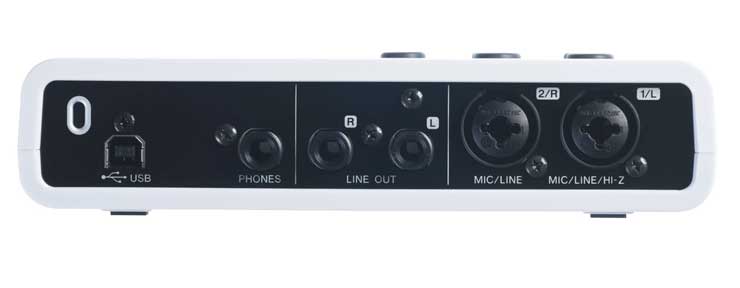
The USB cable plugs into the back of this little unit. Next to it is another female jack, where we can connect optional external headphones. Then two more female jacks to carry the monitor signal we can send to some kind of speakers, so we can hear the results of our work. And two more where we can plug in signals coming either from a microphone or line-level signals from some sound source (radio, CD, video, cassette, TV, etc.). Those connectors are balanced and are the XLR type (professional microphone inputs) or the same ones, also the TRS type (the “classic” jack, like the ones electric guitars use).
If the microphone you connect requires PHANTOM power (and its necessary 48 volts), that option is available here too. It also has low- and high-impedance adapters, for example to plug in an electric guitar or any other type of electronic musical instrument directly.
Any type of microphone or audio signal we connect to its input jacks will be perfectly matched by this CI1. The appropriate software for correct operation is included, such as the Sequel LE and WaveLab LE 7 programs, which come on a DVD in the box along with other printed instructions, as well as the USB cable and everything that seems necessary for a quick start.
The instructions for the Sequel LE program can be consulted by opening a PDF file, which is accessed by clicking the HELP option. When installing that software, we have to register over the Internet, entering the corresponding numbers or details noted specifically alongside the unit.
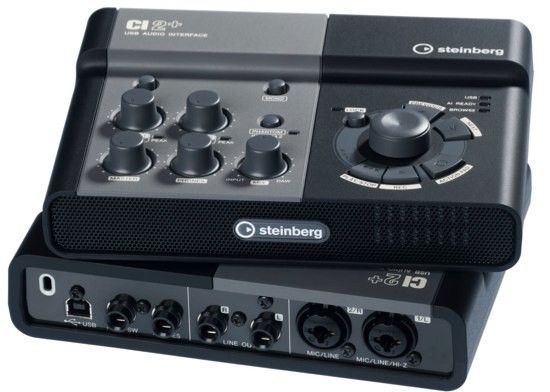
CI2+
It has the same inputs as the model described above, as well as phantom power and impedance matching. But this model also adds another connection on the back to plug in the jack from a “command pedal” for those recordings where, without letting go of the instrument—our hands being busy with it—we start or stop a take with our foot. That pedal isn’t included with this unit, but it’s an easy option to get from a distributor.
The biggest difference from the CI1 is that the CI2+ adds other types of controls, such as a knob called AI (Advanced Integration), another for ACTINO PAD and other combined controls that are useful when we’re using the CUBASE program. It comes with a version of CUBASE which, although somewhat more limited than 5.5, will be more than enough for us to make magnificent recordings.
In my judgment, this model is far more useful than the CI1, so it is worth paying the price difference, all the more so if you don’t already have a legal copy of CUBASE, not only because being registered gets you customer support, but because some versions of CUBASE circulating on the Internet are either quite old or have many of their options crippled. I don’t know anyone who has managed to get a pirated version 4.0 or higher of CUBASE that also works properly.


