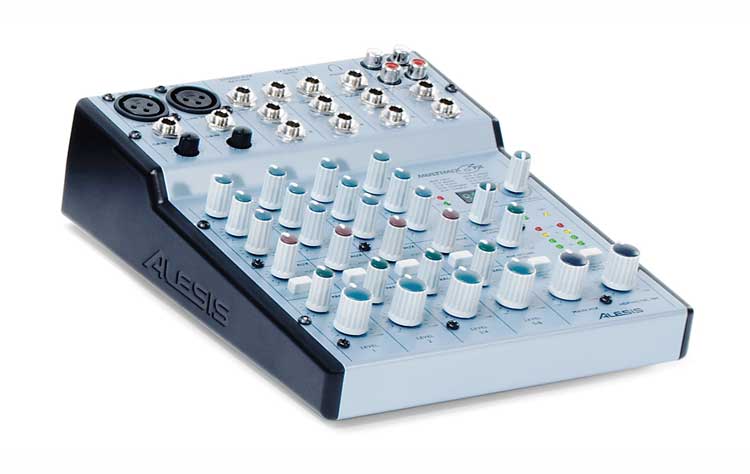
 Here we have a compact mixer from Alesis, part of the Multimix series. The series includes a range of mixers that goes from this “little one” through 8, 12 and 16 channels with S/PDIF outputs (models 12FXI, 12FXD and 16FX) in its “repertoire.”
As with the product under review on the following pages, Behringer's UB 1202, we used the mixer in a “home studio” system, connecting it to the sound card installed in a PC. Our tests were based on recording various instruments to the hard drive, checking the fidelity and versatility of the EQ, signal quality when raising the gain, noise levels and so on...
Features
MONO CHANNELS 1 and 2
XLR and 1/4” jack inputs
Gain
Hi - Mid - Low EQ
Aux/effect
EFF/AUX switch
Pan
Level
STEREO CHANNELS 3/4 and 5/6
1/4” jack inputs
Hi - Mid - Low EQ
Aux/effect
EFF/AUX switch
Pan
Level
CONNECTIONS
Stereo Aux Return
Ext Aux Send
Headphone output
Track in/out (stereo)
Main Mix outputs
Control Room outputs
MASTER SECTION
Effect level
Aux Return Level
Main Mix Level
Headphone/Control Room Level
EFFECTS UNIT
Having reviewed the console's technical capabilities, let's move on to the effects. We'll go into this section in more depth, since it's the biggest advantage over other small mixers without FX.
The effects section is located in the master section, on the right side of the panel. It has a digital display showing the program number we select, as well as a knob/switch: turning it selects the program number, and pressing the same knob confirms the chosen program number. Afterward, using the master effect level and each channel's aux controls, we set how much of the effect is sent to the selected channel.
The effects available on the Alesis MULTIMIX 6 FX are the following:
Presets 0 to 9: Hall
Presets 10 to 19: Room
Presets 20 to 29: Plate
Presets 30 to 39: Chamber
Presets 40 to 49: Chorus
Presets 50 to 59: Flanger
Presets 60 to 69: Delay
Presets 70 to 79: Pitch
Presets 80 to 89: Multi (combinations)
Presets 90 to 99: Multi 2 (combinations)
Considering the price and the versatility of this little device, the quality of these effects is reasonable, with a moderate noise level. And although we have only limited control over them, since we can't adjust speed, depth or repeats, the different presets offer a wide range of variations on the same effects. By finding the right preset and sending the exact amount to our channel, we can get some interesting results.
In Use
For anyone who needs to blend signals from different sources, mix and tweak them, and send them out through the corresponding outputs, this compact mixer offers quite a few solutions at a very low price (especially considering the built-in effects unit).
As I explain in the text on the UB 1202, by connecting the console between the sound card input of the PC/Mac and our sources, we can:
1. Boost the signal with the gain if needed
2. EQ it to taste before the signal reaches the computer
3. Supply phantom power to condenser mics (48V)
4. Insert effects from our little console
5. Make use of the XLR connections
For those who work in audio, there's little to say about its use, apart from noting how handy it can be for small applications or small installations where the client needs a mini mixer with easy-to-use effects.
Conclusions
As I concluded with Behringer's UB 1202, if we compare these two consoles (mixers) as purchase options: the Alesis effects unit justifies its higher price, even with fewer channels and without the high-pass filters or the input sensitivity switches found on the UB 1202. One detail I like about the Alesis compared with the Behringer is its power switch, alongside the phantom power switch. The Behringer (like others) has no power switch, which means we have to cut the power by other means, such as unplugging it every time we disconnect it.
In conclusion, we think it's a reasonable price for a compact, lightweight format with enough channels for small applications that gives us a basic effects unit in an “all-inclusive” package.