Pro features in the lightest format you can imagine. In recent times, new devices have emerged that have reshaped some of our activities. The concept of mobility, of working anywhere, along with the need to record even in the odd corner without too many complications, has led to a range of portable devices tied to our tablets and phones, tiny travel interfaces for our laptops and, of course, controllers adapted to those sizes and contexts.
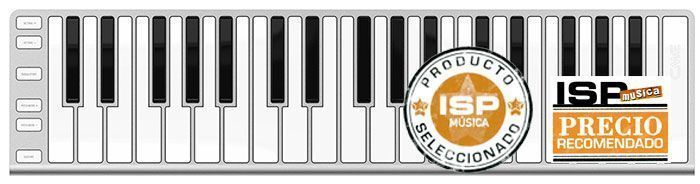
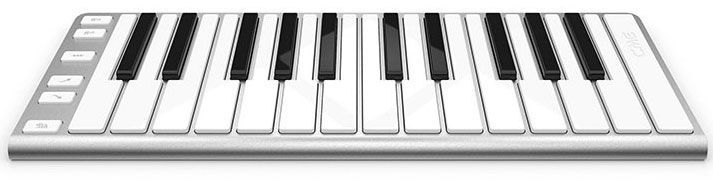
As soon as we saw the XKEY images we were drawn to their design and format. Although there are other similar devices (basically mini keyboards for sampling and editing), CME's models have some additional appeal in our eyes. For example, their Apple-style aluminum finish. Although CME controllers are available in various colors in case you're into visual flair, this aluminum look (if you're a Mac user, I don't even need to tell you, for the aesthetic match with the rest of your gear) is modern, elegant and understated. We asked its importer in Spain, Letusa, for two units of the product, in the 25-key and 37-key formats. We really wanted to find out whether that compact but appealing look, at 16 mm thick and 600 g in the smaller format, would actually make for useful tools for working professionally.
“I'm heading to Seville on the AVE high-speed train to play with Pasión Vega. What do I do for these two and a half hours? Keep working with the XKEY controller, and it's like being at home!!!" Jacob Sureda (Ismael Serrano / Pasión Vega)”
So here they are, and we plugged them into several different "critters." First, we connected the XKey25 to an Apple® laptop running Pro Tools. Extra-fast connection via USB cable (included with the controller). Instant plug-and-play with no need for any MIDI cable or power adapter. Pro Tools immediately recognized the master keyboard and we got to work right away. There were two things (which we checked on both devices) that piqued our curiosity in our tests. The first was the feel and playing comfort given the key size. In that regard, and within the compact context we're working in, the real key size makes playing quite natural. In other words, the proposition is very valid for certain sequencing or editing touch-up jobs in professional settings.
As you can imagine, the 25-key version is especially handy for working in almost any corner, with no space. Very comfortable for drum editing, touch-ups and programming basic structures to build up our tracks, and so on. Though if you get the hang of it, with octave shifts, pitch and modulation you can lay almost any kind of sequence onto your tracks. Continuing on this point, keyboard size and key spacing, note that the bigger version obviously gives us a bit more range. The key size is exactly the same, but two-handed playing is somewhat more practical. In addition, the XKey 37 includes a cable that gives our "little one" three connections: a MIDI DIN-5 output and inputs for a sustain pedal and an expression pedal.
"It's very practical, you can have sustain and expression, which almost none of them offer, it's super thin and light, and it comes with a very handy carrying bag. It's the smallest controller with 37 keys, which makes it very attractive."Adrian Schinoff (Pablo Alborán)
The second thing to verify when testing the keyboard live was the real sensitivity of its keys. That is, each key's ability to dose out MIDI velocity polyphonically and thereby get really well-controlled jumps between sample layers. As you know, with multisampled instruments, a single key triggers a good variety of recordings of the same instrument or note, played in real life with different dynamic levels. Because the controller's MIDI sensitivity is good, we can handle this multisample triggering in a truly realistic way, and enter "sensitive, human" performances that don't require a mountain of editing work on screen afterward.
To run this test, we triggered drum samples from especially rich and complex libraries. In these, for example, a single key can trigger up to 7 different snare shades (for instance). Or cymbals that ring out bell-like at high velocities and very "soft" at low MIDI velocities.
The test results were perfectly satisfactory, and we concluded that you can work seriously with this product. If you're tight on space, want great mobility, or need a keyboard just a bit bigger than your computer's for some MIDI touch-ups while editing, next to your desk or control surface, the XKEYs are an eye-catching alternative at between 119 and 229 €. Xkey and Xkey piano, two free apps for configuring and playing. An additional advantage is the availability of free apps for editing and configuring your XKEYs: MIDI setup, sensitivity, keyboard response curves and so on.
The Xkey Piano app can also be downloaded freely for both Mac and Windows, and it offers a sampled "grand piano" sound, ready to play directly with the device connected.
Windows : http://www.cme-pro.com/xkey/XkeyPlus/Xkey%20Plus.zip
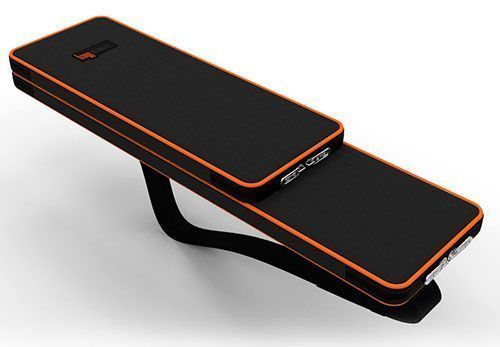
Conclusions. After seeing the units in their individual cases, or even carrying both mini keyboards in a small two-compartment case, we think these tools offer broad coverage. Both for professionals who don't want to stand still and want to expand their portable gear, and for home studio users with serious space limits and/or whose usual kinds of sequences mean a controller like this is more than enough for arpeggiating, programming drums, pads and so on. Finally, why not, a user who wants to get into the game but doesn't know what it's all about could easily start out with an inexpensive, portable controller to "tinker" in whatever space they're in and get familiar with the subject without spending more than necessary. We liked the Xkey family. Head to Letusa's website to find all the places where you can try and buy these attractive controllers, online or in person.