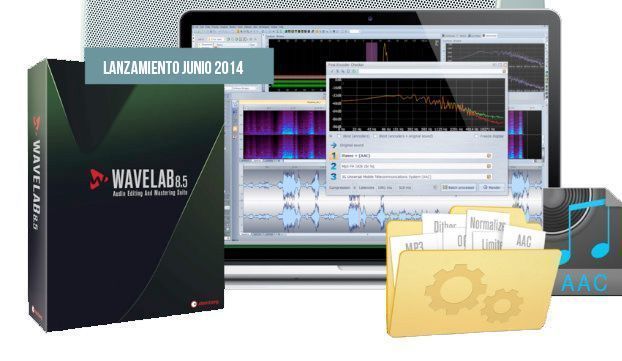
 The release of the new WaveLab 8.5 was announced in June 2014. An update to its audio editing and mastering application. This tool speeds up workflows for essential tasks, as it includes easy file conversion, A/B comparison between encoding formats, an AAC encoder and multi-format rendering.
Watch Folders: An automated drag-and-drop offline processing feature that uses standard operating system folders to process and render audio files.
Encoder Checker: Compares and contrasts codec quality and settings on the fly with no perceptible latency, with up to three streams simultaneously, such as MP3, AAC and OGG Vorbis.
Multi-format rendering: Renders multiple audio files simultaneously, saving the encoding chains as presets.
AAC encoder: Encodes directly to AAC formats, such as HE-AAC, HE-AAC v2, HD-AAC and 3GPP, for compatibility with Apple products such as iTunes, iPod and iPhone
Watch Folders: Drag-and-drop folders
By introducing watch folders, WaveLab 8.5 speeds up batch file conversion by outsourcing it to any designated standard folder of a supported operating system. WaveLab can also be used to create any number of Watch Folders for normalization, plug-in rendering and audio file format conversion.
Audio files placed in the folder are automatically converted using the processing commands assigned to that folder. After setting up the watch folder processor, its function runs in the background of the operating system, without the main WaveLab application needing to be running.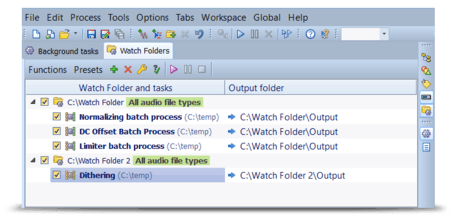
In addition, files exported from Cubase can be converted when the watch folder is assigned Cubase's export folder as its target. This tool saves time and money by creating efficient, optimized workflows, especially when a large number of files have to be rendered.
Encoder Checker: Ensuring the best quality
The new Encoder Checker feature offers a new way to compare common encoding formats and their settings by generating a multistream preview player. This includes the original material and up to three streams, each from its own encoder and with the selected settings.
A real-time FFT graph lets you not only hear but also see how the encoder and parameter selection will affect the quality of your audio. This new analysis tool offers real-time A/B/C comparison of variable bit rate MP3, such as 192 kbit MP3, 128 kbit MP3, iTunes-compatible AAC or Ogg Vorbis formats.
AAC ENCODER for full iTunes compatibility
With WaveLab you can encode directly to AAC formats for compatibility with Apple products such as iTunes, iPod and iPhone. This allows music or recordings to be converted directly to the AAC format (for example, HE-AAC, HE-AAC v2, HD-AAC and 3GPP) for uploading to the iTunes platform. The AAC encoder is implemented in the file export dialog and can also be used in combination with the new background watch folder rendering feature, as well as with the Encoder Checker to ensure superior audio quality.
Multi-format rendering
With the new multi-format rendering feature, WaveLab 8.5 introduces another tool that streamlines file export handling. This new time-saving feature lets you export the current audio files to a number of different file formats at the same time using multicore technology.
Of course, the multi-format rendering task can be saved as a multi-format preset, complete with all the necessary settings, such as format, bit depth and sample rate, so it can be recalled immediately when needed. Multi-format rendering is implemented within the existing file export dialog. This new feature saves time when delivering a file to different "end users," such as a CD, platforms or players that use MP3, iTunes, or email recipients of preview material.