
A quick note on terminology: the Spanish translation in the KORE 2 instructions renders what we are more used to hearing in English as PLUGINS. Each of them is a small program, or set of computerized instructions, that adds an ever more sophisticated range of sounds (usually originating from magnificent conventional instruments) or professional special effects to our systems. And why are we talking about this?
The enormous number of plug-ins that now reach us as software, from the various hardware units we work with, plus those obtained over the Internet or from the countless libraries within our reach, make them hard to use or even to review for their potential effectiveness among our equipment, and hard to distribute properly across our music productions, which are now more professional and handled with these excellent tools that we can get at such affordable prices.
KORE 2 puts all of this in order in a logical, easy, quick, affordable way that takes up very little space. This is by no means the only solution out there, but NATIVE INSTRUMENTS has undoubtedly developed, first with its KORE and now in version 2, a machine well worth considering, which I now have in my hands and will describe.
What Does KORE 2 Offer?
Small as it looks, its real content inside is impressive, especially in handling so much software from “its physical hardware.”
It's impossible to review its contents in full with what I can describe in just these four pages, but I'll try to comment on “some parts...” of what it does or manages.
KORE 2 contains more than 500 sounds, each of which can be transformed indefinitely using the buttons, switches or the smooth eight knobs visible on its chassis.
On its small illuminated digital display, the results and possibilities of its inner workings appear continuously.
The switches that are active at any given moment stay lit with a dim light to confirm their action or possible new function.
Reviewing all those 500 sounds will of course take some time. There are some magnificent ones, as you can imagine, especially the synth-type sounds, whose spectacular quality grows and swells, or softens, as you work the KORE 2's controls progressively with an apparent “natural continuity” (even with virtual sounds).
In addition to handling its own sounds, KORE 2 can also act as a host to house or manipulate hundreds or thousands of other sounds or plug-ins (and not just those involving audio or MIDI components) coming from outside, for example from a computer (PC or Mac), to which it will be connected via a USB 2 connection that also supplies the small amount of electrical power KORE 2 needs to operate.
The unit comes with a CD containing the control software, which we install on our computer, activating on its screen many tools useful for operating the KORE 2. So, on almost every occasion we use the KORE 2, it will need to be connected to at least a laptop to get the most out of it.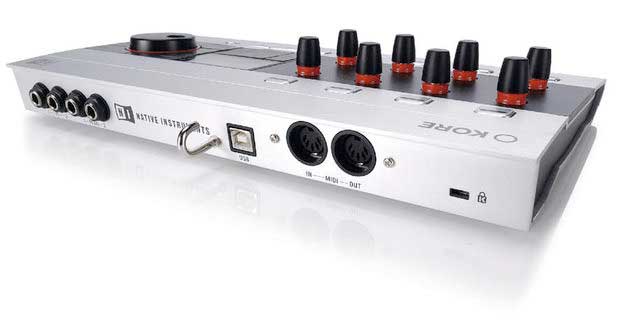 Rear Connections
It has separate DIN input and output connectors (MIDI IN and MIDI OUT).
Next to them are other connectors for plugging in jacks from pedals, which can be used to carry out effective occasional expression (volume, sustain, etc.) or other functions that are more comfortable to control with the feet.
For example, a master keyboard could be connected to the MIDI IN, while the MIDI OUT could go to an external drum trigger or to a device holding other samples. This machine has controllers for a wide variety of calibrations and adjustments, and for working with all of our equipment in a reliable and immediate way.
Using the KORE 2 Controllers
By moving them we can, for example, create that sense of continuity with each of the sounds in real time, so that when using sounds such as synths or electric pianos, the results are very spectacular, forceful and expressive. These controllers are very sensitive to the fingers, a sensitivity we can even fine-tune to taste using the KORE 2's configurable tools. When one of its controllers is active, its light will blink or turn a bright red, alerting us to its use or to a change in its values.
On the unit's chassis there is a scroll wheel that is very useful for “shortcuts,” giving quick and efficient access to different functions and settings.
KORE 2 Working Together With Other External Programs
Through its USB 2 connection, it can work, for example, connected to a computer, with any sound editor or sequencer, such as Cubase, Logic, Ableton, Sonar, Performer, Tracktion and so on.
KORE 2 can simultaneously control the plug-ins of 16 stereo channels, with their possible combinations of assorted effects, the limit of which, logically, is determined only by the capabilities of the CPU of the computer we're working with (as always...).
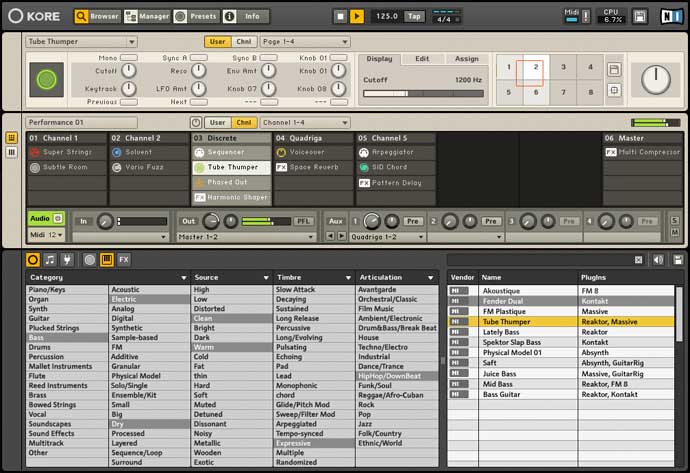
On the computer's screen, the details of how the KORE 2 works appear greatly enlarged, with the data spread across several distinct sections. The top one virtually mirrors the movements we physically make on the KORE 2's controls.
Below that area appear three others that give us detailed information on the activity of the whole system or of specific parts, covering both sounds and the effects being managed, and also allowing us to control the timing of sequences, MIDI players, arpeggiators, sequences and so on. Its drop-down menus can be viewed in different languages, including Spanish.
Some of Its Many Tools
With “Scan User Folders” we can search for the different sounds, or “KoreSounds,” to integrate them into the working database, as well as combine them with those in other folders we like. With “Full Scan” we'll have them sorted in the most logical way. We can also return at any time to the original factory layout and order.
It will be possible to organize them in other orders, adding or removing them individually, and even by groups, until we arrange our workflow the way that suits us.
But there are other ways to tailor our work, for example with “Touch Sensitivity,” to adjust the touch sensitivity of the controls, the contrast and brightness of the data display, the blinking of the LED indicator lights, and the calibration of the effects achieved from the pedals connected to the KORE 2.
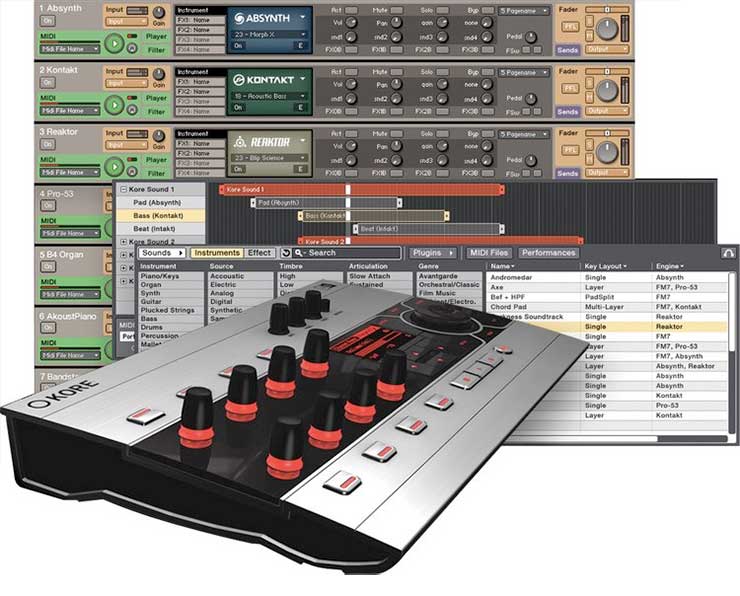
You can work with both single and multiple sounds, together or in different combinations, with varied parameters on each, and all of it can also be altered in real time. Those sounds can come from either audio or MIDI. “Sound Packages” created this way can be copied to another channel, added to, modified, deleted, or altered in groups or however suits us.
Each channel has its own set of six aux sends. For MIDI there are the typical 16 channels, which can work individually or together, and various adjustments to their parameters can also be automated, thereby simplifying their use.
There is an option that lets you preview each sound individually from a working list, with the ability to change its attributes or parameters, or several at once.
With an Enormous Number of Adjustable Effects
Among them, of course, are many types of echoes, reverbs, controlled distortions, chorus, compressors, various tremolos (altering the modulation speeds with an adjustable envelope), wah-wah, dynamic expander, several types of multi-band equalizers (graphic, parametric or “Filterbank” style), flanger, Freq Shifter (frequency shifter), Gate (a gate that suppresses unwanted ambient noise), Grain Shifter (which uses pitch inflections to get more spectacular sounds), Harmonic Shaper (a harmonic exciter that brings out sounds that were previously dull), limiters (which prevent acoustic saturation peaks), Lo-Fi (which compensates for volume losses in signals containing few bits), Mic Conditioner (which, when a mic is plugged directly into the KORE 2, keeps unwanted low-frequency or out-of-phase signals from coming in), Mod Delay (delays by modulation, filtering and feedback, all adjustable), multi-compressor (which combines several effects at once), phaser, Rooms (distinct ambience effects) and Rotor (in the style of B3 organs, as if you were hearing it through a rotating speaker).
With its arpeggiator, the KORE 2 generates a wide variety of very effective patterns, although to use this option it needs MIDI data, of course.
On the Subject of Latency
I know that one of the criticisms the first KORE received among some musicians was how slowly changes to its programming were carried out. I'd say this problem has been smoothed over in this new KORE 2 version, but in any case, given that it will almost always be connected to at least a laptop, any latency will really be directly related to that of the sound card installed in that computer. If that computer is a PC, for example, it would be better to work with an ASIO4ALL-type driver. ASIO is a protocol originally developed by STEINBERG.
In any case, to optimize results, you should set the latency times on that card the way that seems most convenient and then restart the computer, making sure the latest possible software versions have been used. For safety, it's also a good idea to make a copy of the disc containing that installable software.
A fairly reasonable setting might be latency values of around 1.5 ms. But the lower that value, the harder the computer has to work, and so we might run into problems with polyphony or with the number of effects we can use simultaneously. Another reasonable setting would be a figure like 256 samples per buffer, since setting it to 512, for example, could cause noticeable delays.
As always, better gear (processor, sound card, etc.) = more cash on the cost of our CPU, a never-ending story... But we already know that's just how it is!...
A Bit More About Pricing
KORE 2 costs 449 € (distributed in Spain by ADAGIO), which at first glance seems quite economical considering “everything it moves.” Although it could be operated standalone, it's really more effective to use it in combination with a computer (perhaps a laptop), where, among other things, the main sequencer program will be installed, and where we can follow all the process data (which can be almost endless...) better graphically on the monitor. Let's say, then, that KORE 2 will be a complement to a music computer, extending it with tools that aren't usually installed, since most computers are configured for other kinds of work. So the cost of that computer has to be added to the KORE 2, and the computer also performs better at these tasks the higher its quality (and cost) (almost all musicians already tend to have at least one...).
You can work more than comfortably with KORE 2, which comes from the factory with more than 500 plug-ins of all kinds, about 3,000 variations on the preprogrammed main sounds and around 400 magnificent effects; but you'll surely also work with some of the hundreds of plug-in libraries that exist, some free, some not... (perhaps another addition to the bill).
Data Anti-Theft System
Of course, there are other similar or comparable alternatives for producing excellent music. This one is among the lightest and smallest of them, although for me it would need a bit more hardware (more audio inputs and outputs, or a display with more data, for example). KORE 2 is an excellent and “affordable” way to make professional music in the 21st century.


