
Omega Studio contains everything we need to record, monitor, edit and mix our tracks professionally and right away. After a long-awaited wait, Lexicon Pro started shipping the Omega Studio, an audio/MIDI interface with bundled software. Specifically, it's a 24-bit computer recording system that includes the Omega 8x4x2 USB mixer, the 32-track ProTracks Plus software, Bias Deck SE and Lexicon's Pantheon reverb plug-in.
Although the software that comes with the product is truly interesting and would deserve an entire article of its own, let's focus on the hardware first.
The mixer
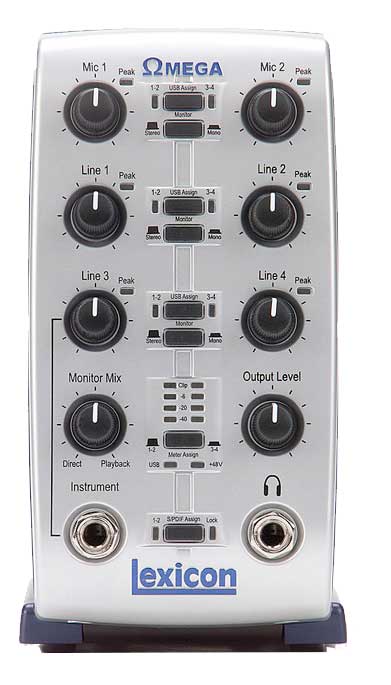
The mixer offers 8 inputs assignable in pairs to any of the 4 recording channels, with 24-bit ADC converters. Two of the inputs have low-noise dbx preamps with 48-volt phantom power and TRS insert points. Four balanced TRS line inputs accept signals of up to +22 dBu. There's an S/PDIF input combined with an additional DAC for zero-latency direct monitoring of the S/PDIF source, allowing simultaneous tracking of analog and digital sources. And, a really nice touch, there's a high-impedance instrument input on the front panel.
It has a peak indicator for each analog input, as well as an assignable meter for checking monitoring levels. It also includes an opto-isolated MIDI input to ensure there's no ground loop interference or MIDI talk-through noise as with many typical computer interfaces. The MIDI output is solidly synced to the USB frame rate to support applications that require critical timing. The unit, very manageable in size and rugged-looking, has what we might call a friendly appearance. The large knobs allow quick access to settings despite its compact size.
Using USB is a big advantage. We already know this port is a high-speed connection to our computer, and devices can be plugged in and unplugged without having to think about shutting down or restarting the computer. What's more, there's no need to open up the computer, no tools are required, and detection by the operating system is complete and automatic. You simply install the drivers and programs and you're done.
 The software
ProTracks Plus is a 32-track recording suite for Windows with all the modules needed to track, edit, process, sequence and mix songs. It includes non-linear editing, plug-in support and looping with Acid files, plus a full MIDI sequencer with event editing and automation, and support for software synths.
For Mac users there's BIAS Deck 3.5 SE recording software, which lets you record up to 64 CD-quality tracks and then edit them instantly, with the ability to always recover the original recordings. The Pantheon plug-in, designed entirely by Lexicon engineers, offers 35 factory presets and 6 reverb types (hall, chamber, plate, room, ambience and custom), controlled by a user interface with 16 editable parameters.
The test
Installing the software brought the pleasant surprise that it worked on the first try, a situation that is, unfortunately, quite unusual.
The feel of the knobs and buttons is different from what we got with units of the same philosophy we had tested before. It's something like having a progressive sensitivity at your fingertips that's very comfortable. The rear connectors are firmly anchored and of good quality. The first thing we did was check that the input assignments were correctly identified in the software (ProTracks Plus), and the second... well, the second, surprisingly, was to start recording. We used the four balanced line inputs to record some synths and then did the same with some percussion we had in MIDI format. An electric bass rounded out the first phase.
Before deciding to add vocals (we were on a roll), we recorded several guitar takes, and almost without realizing it we found we'd already recorded 14 tracks. There were no attenuation problems, and the gain stayed within the ranges we needed at all times. The mix, after adding a couple of vocals, was really fun. The Pantheon plug-in let us get up to all the mischief we wanted with effects, and we even created a few of our own in very little time.
We did find one drawback (we had to find something, since we know perfection doesn't exist), and it seemed to us that it would be very easy for Lexicon to fix. The unit, which at full use can have no fewer than 18 cables connected, lacks weight. So many cables create a lot of pulling tension, and it's hard to get the Omega to stay in the position we want. Obviously we solved it quickly, but a lead plate in the base would eliminate the "but."
Final word
It differs from standard interfaces based on a patchbay format by using a mixer layout that includes input, output and mixing functions to support a variety of tracking and monitoring applications without requiring additional hardware.
We hardly needed to consult the extensive manuals to get working at full speed.
Omega Studio SPECIFICATIONS
- Mic inputs: 2 female XLR.
- Input impedance: 664 ohms balanced.
- Phantom power: +48 volts.
- EIN: -118 dB @ 51 dB (150 ohm source impedance).
- Maximum input level: -2 dBu.
- Frequency response: +0, -0.2 dB from 20 Hz to 20 kHz (ref. 1 kHz).
- THD+N: < 0.005 %, 20 Hz to 20 kHz.
- Inserts: 2 x 1/4" TRS balanced or unbalanced.
- Send level: Maximum +19 dBu.
- Return level: Maximum +19 dBu.
- Line inputs: 4 x 1/4" TRS balanced or unbalanced.
- Input impedance: 20 kOhm unbalanced. 10 kOhm balanced.
- Maximum input level: +19 dBu (40 ohm source impedance).
- Frequency response: +0, -0.2 dB from 20 Hz to 20 kHz (ref. 1 kHz).
- THD+N: < 0.012 % A/D, 20 Hz to 20 kHz, < 0.012 % A/D/A, 20 Hz to 20 kHz.
- Instrument input: 1 x 1/4" mono jack.
- Input impedance: 1 MOhm unbalanced.
- Maximum input level: +19 dBu.
- Frequency response: +0, -0.25 dB from 20 Hz to 20 kHz (ref. 1 kHz).
- THD+N: < 0.0125 % A/D.
- Crosstalk: < -74 dB input or output on any channel, 20 Hz to 20 kHz. < -95 dB at 1 kHz.
- Line outputs: 2 x 1/4" TRS balanced or unbalanced.
- Maximum output level: +19 dBu.
- Impedance: 110 ohms.
- Headphone output: 1 x 1/4" stereo jack (100 mW per channel at 50 ohms).
- MIDI Interface: DIN connectors for MIDI-IN and MIDI-OUT.
- Digital audio input: Coaxial RCA (S/PDIF format).
- Digital audio output: Coaxial RCA (S/PDIF format).
- D/A and A/D conversion: 44.1 kHz or 48 kHz (set by software).
- Dynamic range:
A/D: > 101 dB, 20 Hz to 20 kHz. > 104 dB 20 Hz to 20 kHz.
D/A: > 107 dB, 20 Hz to 20 kHz. > 109 dB, 20 Hz to 20 kHz.
A/D/A: > 100 dB, 20 Hz to 20 kHz. > 103 dB, 20 Hz to 20 kHz.
Analog connections: > 115 dB, 20 Hz to 20 kHz. > 118 dB, 20 Hz to 20 kHz. - USB Type B: Version 1.1.
- Power: PS0913-B adapter.
- Dimensions: 118 x 184 x 197 mm.
- Weight: 1.2 kg.
-
Pro Tracks Plus FEATURES
- Developed in collaboration with Cakewalk.
- Integrates multitrack recording, editing and mixing of audio and MIDI.
- 32 stereo audio tracks.
- 32 simultaneous plug-ins.
- Unlimited MIDI tracks.
- 24-bit recording, mixing and processing.
- Full editing capabilities.
- Ability to work with custom key bindings and screens.
- Includes the AAS Tassman SE analog synth module.
- Produces and burns professional-quality CDs.
- MIDI file import.
- Unlimited number of real-time markers.
-
Pantheon Reverb Plug-In FEATURES
- 35 presets and an editor for creating more.
- 6 reverb types (hall, chamber, plate, room, ambience and custom)
- 16 adjustable parameters.
- Easy-to-use interface.
- Mono and stereo operation.
- 16- and 24-bit compatible.
- Efficient CPU usage.
- Sample rates above 96 kHz.
COMPUTER REQUIREMENTS
PC
-
Pentium III at 500 MHz (1.2 GHz recommended).
Windows 2000 or Windows XP.
128 MB of RAM (512 MB recommended).
100 MB of hard disk space.
EIDE/Ultra DMA hard drive at 7,200 RPM or faster.MACINTOSH
Power PC, G4 processor (450 MHz or faster).
Mac OS X version 10.2.8 or later.
128 MB RAM (512 MB recommended).
20 MB of hard disk space.
Hard drive of 18 ms or faster.
QuickTime 3.0 or later.


