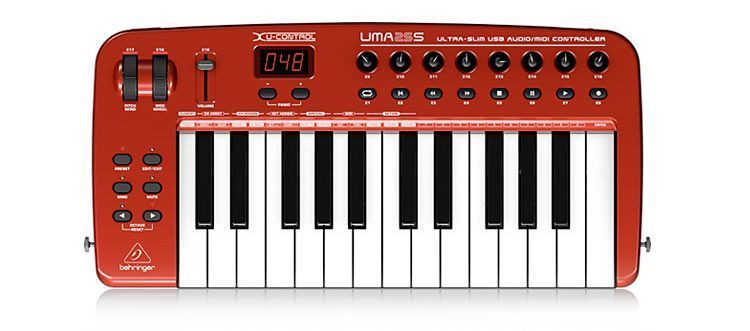
It has almost everything you need to run a track, starting with a two-octave, 25-key keyboard (piano-style) that can be extended by another four octaves, two up or two down, just by pressing one of its buttons. We can also adjust the keyboard's sensitivity to our liking, in four modes: FIXED, SOFT, MEDIUM or HARD. It also supports transposition and octave shifts.
Beyond its look of a big toy, though it isn't one, the most incredible thing is that the UMA25S hit the market at a price of €118
Naturally, you can feed this machine signals from your music project generated by another instrument that also contains the features and processes needed over MIDI, so that, once routed to this controller, you can develop its effects and finish off the rest of the results to your liking.
It has a generous number of controls and connection options that make it easy to direct the possibilities of any preset or plug-in from it. You can even control the software loaded on your computer from here, forgetting about the mouse as unnecessary.
That keyboard, “like the biggest master keyboards,” has its own PITCH BEND wheel (with which you can bend pitch in real time by several semitones up or down, returning to natural pitch when it sits in its normal, centered detent) and another wheel next to it called the MOD WHEEL, which can perform different modulation functions as a fast-acting MIDI controller, but returns to its original position when we “let go.”
A small illuminated window lets us follow the different internal actions the device is carrying out at any moment. For example, when we first power up the controller, the window tells us which system version it's running and then shows the active preset, in case we want to adjust it differently. When we're in edit or mix mode, for example, the display gives us valuable information on program numbers, channel, parameters and their values, and so on.
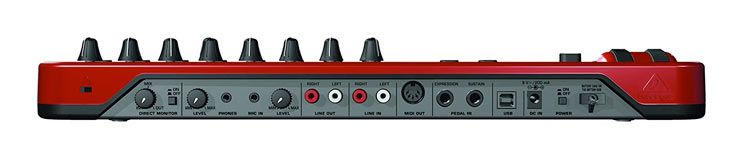
We can adjust the keyboard's volume with its FADER on the chassis, or, if we're listening through headphones, the headphone volume can also be adjusted independently with another pot on the back of the unit.
Easy to Handle
It has many more buttons and controls, which you'll soon get familiar with and which perform a multitude of functions. One of the most important buttons on this machine is located to the left of the keyboard and is called MMC. Its action combines with a series of other buttons, also located on the top right, with which you can even control all the functions of a digital recording, make loops, and so on. At first it might seem complicated to operate, but as soon as you start experimenting with it, you'll even find “shortcuts” in your own way of working with it, whatever seems most effective to you.
It's almost like going from “eating with your fingers” to using a knife and fork... But however inexperienced you may think you are, you surely already have a good grasp of what MIDI functions are. If not, the unit comes with plenty of documentation in many languages, of course including perfect Spanish, as well as a great number of very clear and concise drawings that, in just one glance, can help you understand a great deal about how to get the best out of it.
Small in Size, Broad in Possibilities
Even the total weight of this controller is very manageable (you can carry it under your arm...), yet the huge number of functions you can perform with it is surprising, even as a keyboard instrument, which is without doubt not its most important aspect compared with the other functions you can manage with this device. It can be supported with a strap over your shoulders, as if it were a guitar, and it will even let you play spectacular and surprising “solos” on stage with a wide range of sounds and effects.
Besides the abundant controls on its chassis, the back has a series of possible connections, via MIDI cables and USB (1 or 2), to a monitor, to another mixing console, to an amplifier or to some type of recorder. It can also receive signals from another machine or electronic device with sound content, or signals from a microphone.
When working over MIDI, one of the problems that usually arises is LATENCY, which this machine is designed to tackle as effectively as possible. LATENCY is a small gap of time between the moment we execute a command (for example, pressing a key on the keyboard with our fingers) and the moment the machine responds, producing the sound we've assigned to it. In any case, we're talking about microseconds, and its responsiveness will also depend on the quality of the installed software and hardware (for example, the installed sound card). When recording its MIDI instructions, the UMA25S also sends the signals directly to the LINE OUT or headphone outputs, so we don't perceive any delay and can sync it better with other new musical sounds.
Generously Equipped
It has 21 assignable controllers. It comes with two CDs for loading onto your computer (for stage use, a laptop would surely be better). That way you can make better use of its more than 100 virtual instruments and the more than 50 plug-ins it comes with. It also includes, if you want to use it, powerful ABLETON LIVE software, as well as the version tuned by Behringer, better suited to this machine.
This software is designed to install on any operating system, PC or Mac, and of course on Windows XP or Vista. Since the software installs itself (plug and play), it won't give you any trouble.
In addition to an effective protective bag, inside you'll find the strap for hanging it from your shoulders if you prefer to use it that way on stage. It also includes a headset with a microphone, which can be very useful at times (perhaps on stage).
Its interface works at the standard 16-bit class at 48 kHz, 44.1 kHz or 32 kHz, as suits us on each occasion.
It runs on power from an AC adapter (optional, not included) plugged into the back, from USB, or from three AA batteries (not included) that sit inside the unit in a special compartment.
Expression pedals or personal controls can also be plugged into the back.
The notes on its keyboard can be set to perform a special MIDI function, which will be very useful while we play music with the rest of the keys, keeping some of its functions more accessible.
BEHRINGER has another similar controller in its catalog, called the UMX-25, which is even cheaper than the UMA25S described here but has fewer features, although it also has a 25-key keyboard.
The UMA25S is much more than its apparent “big toy” design, which it also seems to be because of its price, which is undoubtedly one of its greatest assets given its enormous professional features and creative possibilities (many of them yet to be explored).
Although its illuminated display (which constantly tells us about each function it is performing) is quite effective, I think it could be somewhat larger and show some more information about its contents, not just through a few numbers.
As we experiment with it, we'll find many more uses, both as a digital workstation for our personal music projects and as a spectacular instrument on stage. And for only €118... Where will we end up!... ;-)