
After the M-Audio JamLab test left us with a good taste in our mouths, my interest grew in portable guitar/computer interface devices, aimed especially at the average user. But regardless of who uses it, these are, above all, extremely portable systems meant to provide a mini-studio wherever we go. That said, let's see whether StealthPlug surprises us with something new, or whether it's more of the same.
Unboxing
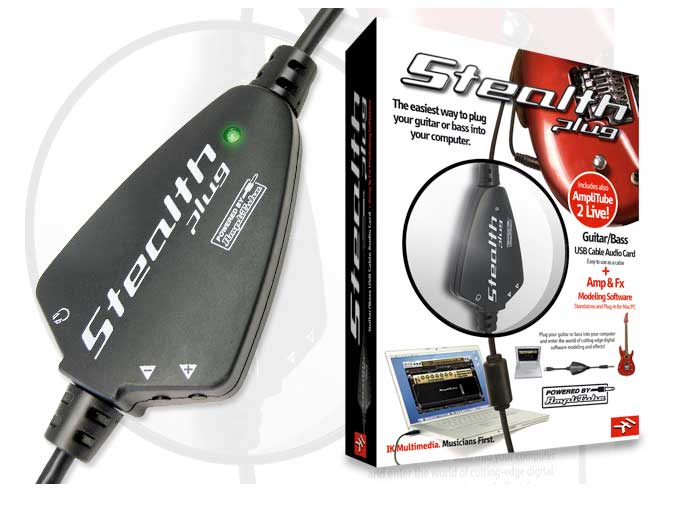
We open the box and it looks promising: an interface with volume controls, a USB cable to connect to the computer and a 1/4” jack cable to connect the guitar; an instruction manual, two CDs loaded with recording and simulation software, and product registration cards.
The Interface
At first glance, I found it more attractive than the JamLab, especially because of the added volume controls.
As I mentioned, besides the USB cable, it also includes a 1/4” jack cable for connecting the guitar. The only drawback here is that the cable is very short, and depending on our preferences, we might feel uncomfortable if we want to place the device far enough away that it doesn't get in our way. In this respect, I personally prefer the JamLab.
Plugging In
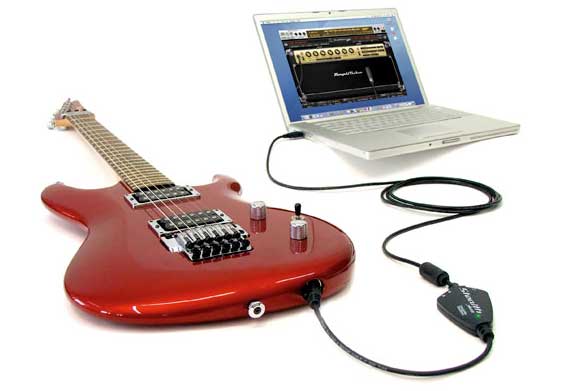
As soon as I connected the USB bus to the computer and the 1/4” jack plug to the guitar, I found that it's possible to make the instrument sound without any recording software, straight to the output. This is new compared with the JamLab, since that was something you couldn't do with it.
This means that, in principle, the only essential elements are: instrument, interface device and computer. However, as is obvious, we will use the simulation programs.
The tests were carried out on the two platforms supported by StealthPlug: a PC with an Intel Pentium IV processor at 2.0 GHz, with 1 GB of RAM; and a Mac MacBook with an Intel Core 2 Duo processor at 2.0 GHz, with 1 GB of RAM.
 Trying Out Configurations
The truth is that, as expected, the Mac performed better than the PC. For starters, on the PC it's only possible to configure the device at 48 Hz, whereas the Mac supports 44.1 and 48 kHz. In addition, StealthPlug is compatible with Apple's USB audio driver. So, to use the Stealth on Mac OS X 10.4 or later, no additional driver needs to be installed. You simply plug the interface into one of the available USB ports. For satisfactory results, do not connect it to a USB hub.
Installing on a PC running Windows means waiting for the driver installer to prompt you to connect the device.
In terms of compatibility, I found the JamLab more versatile, since it included Core Audio, ASIO 2, WDM, ReWire (Mac) and VST interface drivers, whereas the StealthPlug supports ASIO, CoreAudio and VST. Audio quality also differs, as the analog-to-digital/digital-to-analog converter is 24-bit on the JamLab and 16-bit on the StealthPlug.
In the StealthPlug control panel you can configure the sample rate (except when the host is using the ASIO driver); the input sensitivity (to set it, the best approach, if we plug in a guitar, is to play fifths and octaves and adjust the input gain control so that it is high without clipping) and output; sending the direct signal to the monitor (which lets you monitor the instrument at latency very close to zero, as long as no other audio application is active); and the latency setting (buffer size).
As I have said on previous occasions, keep latency in mind with respect to your computer's specs, because small or minimum buffer values give a very fast response, but such values can put an excessive load on the CPU, whose memory can end up collapsing and lead to a system lockup. System performance and configuration are a determining factor in how well it operates. As I say, if an application is using the StealthPlug's ASIO, you can't change the buffer size value from the StealthPlug control panel. In that case, it's best to close the application before changing the buffer size. Whatever the case, I set the latency to the minimum on both machines, and I didn't notice any lockups.
The buffer control, though not the most sophisticated, does its job. You can't change the value one unit at a time, only by level. Here is a sample on the PC, running Windows XP, at 48 kHz:
Buffer level: Buffer size
- 2: 96
- 3: 144
- 4: 192
- 5: 240
- 6: 288
- 7: 336
- 8: 384
- 9: 432
- 10: 480
- 12: 576
- 14: 672
- 16: 768
- 18: 864
- 20: 960
The Software Package
Here I got a pleasant surprise, as it's a considerably more complete package than I expected after my experience with the JamLab. It includes:a) AmpliTube 2
A tube amp simulator for guitar and bass that's easy to use, with options for adding effects, an attractive interface (the amp controls, the effects shown graphically as stompboxes with adjustable controls, etc.), a metronome, a tuner and a backing track player that lets you change its tempo to suit your preferences. There are three amps whose interface and sound make the intended simulations very clear: Marshall JCM 800 (guitar), Fender Twin Reverb (guitar) and Ampeg SVT (bass). It comes as a standalone program and as a plug-in compatible with most of the widely used sequencing programs, including Pro Tools, Cubase, Logic and GarageBand, among others.b) Tracktion 2.1
An easy-to-use audio/MIDI sequencer for making mixes and then exporting them. The interface can be displayed in four languages (English, French, German and Spanish). Simpler to use than Cubase or Pro Tools, though with fewer features. It can run on Mac or PC, under OSX or 2000 and XP respectively.One thing I liked is the ability to record tracks for an unlimited time (limited only by memory capacity and CPU resources, whose consumption is, by the way, very low).
c) SampleTank 2 SE
An audio and MIDI sample creator, with a multitude of instruments to design them with. The interface features a keyboard and controls for that purpose, so I was able to create backing tracks with 64 different instruments using MIDI tracks (it also works with a physical keyboard to build them), for later mixing with Tracktion, with surprising ease of use that also offers great versatility.d) T-RackS EQ
A module that lets us vary the signal's frequencies with a six-band equalizer, high-pass and low-pass filters, as well as gain and loudness. An excellent complement to AmpliTube 2.e) 500 MB of audio loops with real instruments
A package of WAV files with riffs and sequences created from different instruments: drums, guitar, bass, keyboard, etc.These fragments are geared to specific musical styles, which extends their appeal to musicians of all disciplines (blues, country, rock, metal...). Good material, ready to use as a foundation for SampleTank 2 SE.
As you can see, the included software lacks nothing. I was surprised by IK Multimedia's dedication to copy protection for its programs. To install the drivers and AmpliTube 2 you must enter three codes, plus one that they send by email after verifying the authenticity of the first.
As for AmpliTube 2, I must admit that the amp simulations are quite faithful to their respective originals, although I think it lacks some “meat” for styles that demand very high distortion. I also expected it to simulate at least two or three more amps, though obviously, since it's part of bundled software, we can be satisfied. In addition, there are other versions of this program on the market, whose features and goals vary with price.
Compatibility
What about the classic professional sequencing programs? StealthPlug is compatible with Pro Tools (with which it works especially well), Acid Pro 6 and Sonar 5 (Windows); Live 5, Nuendo 3-Cubase X, Tracktion 2 (Windows and Mac); Logic 7 (Express or Pro), Digital Performer 4 and 5, and GarageBand (Mac).We tested Tracktion 2 on both systems and it works as expected, as it does with Cubase and GarageBand, with excellent performance on the Mac.
Conclusion
I believe the main advantages of this device are its portability and the considerable number of features it offers (such as volume control), not to mention the excellent software pack included. It also allows various configurations in the control panel (sample rate, frequencies, etc.).The drawbacks are (I insist) that the 1/4” jack cable is extremely short, that it supports only CoreAudio and ASIO, and that StealthPlug's possibilities are squeezed out much better on a Mac, whereas with the JamLab the difference between the performance achieved with a Mac and with a PC wasn't as significant, which makes the latter more versatile. Having seen this, you can now form an idea. It's a good interface, with versatile programs (updatable from the Internet) and very lightweight. Small, but mighty.


