 In a world of constant technological innovation, bombarded by all kinds of gadgets that are supposed to make our work as musicians easier, or at least more efficient, it's hard to strike a balance between keeping up with what's new and not succumbing to the inevitable loss of time that comes with following the evolution of so many different kinds of gear.
Faced with this dilemma, I personally prefer to stay out of the new-gear loop, although there's a small catch: every so often I get a call or email from David Martín tempting me to try "something new." That way, without him intending it and without me looking for it, I gradually catch up on a lot of new releases.
Such is the case with the unit I have in the studio today. Although I'd already heard a bit about the RME Fireface 800, this is a great opportunity to experiment with it firsthand.
Getting started
The RME Fireface 800 is a rack-mount interface with 28 simultaneous inputs and outputs, 56 channels at 24-bit and 192 kHz, which can be connected to the computer via FireWire 800 as well as FireWire 400 ports. This type of connection, FireWire 800, is the first interesting and perhaps most attractive feature. In my case, working with a laptop that has a FireWire 800 port, it's a big advantage for taking advantage of this format's data transfer speed and bandwidth.
Let's take a tour of the layout of the controls and other features. On the front panel, on the right, we find an instrument or line input (a second, also interesting feature) with a limiter and tube simulator. This input is ideal for certain types of instruments, especially guitars and basses, since the limiter protects against overloads on the input signal and, to a certain extent, keeps us from getting nasty surprises with digital distortion peaks. In turn, if we push the input level too far, the limiter creates harmonic distortion that emulates the sound of tubes. The drive option, which can be activated through the software, offers interesting distortion that, combined with the speaker simulator, adds an attractive color, in this case to the guitar sound. At the same time, on the right we have four mic/line inputs. These 4 inputs are balanced, with a class A stage, 48V phantom power and two types of connectors, XLR and jack. Finally, on the right of that front panel, we find the monitor output 9/10 or headphone output; the quality of this output is remarkable.
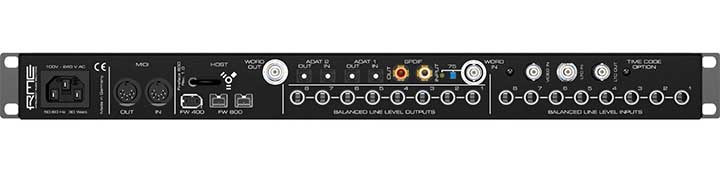
On the back we have MIDI in/out connections and SPDIF input and output, which work at sample rates of up to 192 kHz. There are also 16 ADAT channels on two inputs and outputs, allowing us to connect effects, mixing consoles and external converters. We have 8 balanced 24-bit 192k analog inputs and outputs, word clock, an optional board for LTC and VITC time code sync, and two FireWire 800 connections as well as one FireWire 400.
All settings and reference levels are controlled via software, -10 dBV, +4 dBu, HiGain, as well as the levels of the mic preamps and headphone outputs. Furthermore, all inputs and outputs work at sample rates of up to 192 kHz, although in most cases, or at least in the projects I've worked on recently, nobody works above 96 kHz.
Routing
An interesting aspect is that we can use all the inputs and outputs simultaneously. This means we can connect the jack inputs and the XLR connections at the same time. Through the software we can route and mix them however we like.
Sound
As for the sound, I tried recording different types of signals: electric guitar, flamenco guitar (Raimundo) with its own preamp connected via the jack output, and flamenco guitar through a microphone, plus vocals. I'll just say that the sound is excellent; the mic preamps are of very high quality, as is the analog-to-digital conversion. Not for nothing has RME had a reputation for years for its high-end converters, but now I've been able to confirm it firsthand.
Zero latency
One of the main factors worth highlighting is the feeling of zero latency, which is essential for playing live using the computer's effects and plug-ins in real time. Another valuable quality is that it uses hardly any computer resources; the processor runs very light and, despite adding tracks and effects, I don't feel any extra load, which does happen with other converters, especially those that run over USB.

Quiet
Something else worth emphasizing is that it's very quiet; the noise level is minimal. We could describe the sound as crystal clear, but at the same time not cold, which is common with other systems. Usually we find that more gain means more noise; in this case, more gain simply means more volume. Of all the interfaces I've tested, it's the one that most reminds me of Apogee. In fact, I did part of the comparison using an Apogee, and it really isn't easy at all to tell one signal from the other.
Stability
I don't want to forget to point out the stability of the drivers. Working with this unit has been as easy as plugging in and getting started. I think this is very important. Not long ago, while testing another interface, the exact opposite happened: it destabilized my whole system and gave me problems for days; solution: ditch it.
Standalone use
This unit can also be used independently of the computer, as a mixing console, mic preamp, analog-to-digital converter, mixer for different headphone outputs, etc. Obviously this is also very useful, although it's something almost all units of this type try to include.
Conclusion
I don't think there's much more I can add: this is an excellent unit, and the value for money is excellent too; if I'm not mistaken, the price is around 1,200 euros. It's without a doubt a commitment to quality, and anyone who wants to record audio at a professional level will find this unit a good ally.
SPECIFICATIONS
DA Output: 8 x 1/4" TRS, servo-balanced, DC-coupled signal path. 1 x 1/4" TRS unbalanced
Digital Output: 2 x ADAT optical or SPDIF optical, SPDIF coaxial (AES/EBU compatible)
AD Input: 8 x 1/4" TRS, 4 x XLR Mic, 1/4" TRS line, all servo-balanced. 1 x 1/4" TS unbalanced
AD Dynamic Range: 109 dB RMS unweighted, 112 dBA
AD THD: < -110 dB (< 0.00032 %)
AD THD+N: < -104 dB (< 0.00063 %)
AD Crosstalk: > 110 dB
DA Dynamic Range: 116 dB RMS unweighted, 119 dBA (unmuted)
Input/Output for 0 dBFS @ Hi Gain: +19 dBu
Input/Output for 0 dBFS @ +4 dBu: +13 dBu
Input/Output for 0 dBFS @ -10 dBV: +2 dBV
Sample rate 32, 44.1, 48, 64, 88.2 kHz, 96 kHz, 128, 176.4, 192 kHz
Sample rate : 28 kHz - 200 kHz
Frequency response AD/DA, -0.1 dB: 5 Hz - 21.5 kHz (sf 48 kHz)
Frequency response AD/DA, -0.5 dB: < 5 Hz - 43.5 kHz (sf 96 kHz)
Frequency response AD/DA, -1 dB: < 5 Hz - 70 kHz (sf 192 kHz)
OPERATING SYSTEMS
PC
- Windows 2000 SP4 or Windows XP
- Drivers: ASIO, WDM, MME, GSIF 2.0 and ASIO 2.0. WDM (DirectSound)
MAC
- Mac OS X (10.3. or up)
- Drivers: Core Audio, Core MIDI


