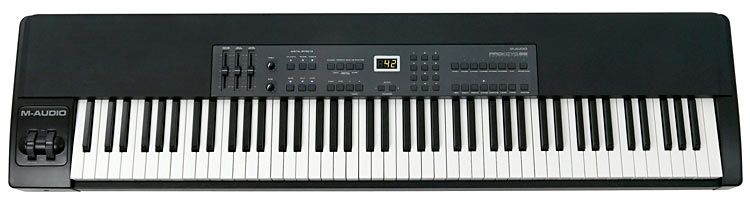
 This is a master keyboard with 88 fully weighted keys and a playing feel very similar to what you'd find on a conventional acoustic piano (where hammers strike the strings to produce the musical notes, which here are played back electronically from samples). It's designed for use by a professional musician, in the studio or on stage.
From this one unit you can control an entire computer system connected to it via USB and MIDI, executing all the precise changes for controlling GM sounds (and, if desired, muting the 14 sounds built into the machine), as well as controlling the tracks of an external sequencer by pressing the controls on the ProKeys 88's chassis with your fingers, with effectiveness, easy access and visual feedback.
It even includes provisions for handling MIDI clock and the changes it requires, and it also has “Modulation” and “Pitch Bend” wheels.
64 MB of Samples, Quite a Bit More Than Many Competitors
Many competing keyboards run on just 16 MB of internal ROM to produce up to 128 different sounds, while M-Audio, in this model, has expanded its ROM to 64 MB, using it mainly to offer just 14 sounds, but much more elaborate and carefully chosen ones, with an evident improvement in quality, since the expanded ROM allows it.
These sounds can be heard through an external amplifier, fed from its audio output, provided on the back with standard ¼" connectors, or through its own headphone output.
Types of Sounds
Besides everything it can also control via MIDI, among the 14 internal sounds the standout on this machine is the “Yamaha C7 grand piano,” built from three surprisingly realistic layers. Of its 64 MB of internal memory, 30 MB goes to that “C7” alone, yielding spectacularly realistic tones that differ from one key to the next.
Besides the “C7,” it has two more acoustic piano sounds, four “electric pianos” (one very satisfying Rhodes-type), two very different types of organ (an excellent Hammond B-3 type that behaves as if it had a “Leslie” when you play with the “Modulation Wheel” at the same time, and a “Cathedral” type that, together with the reverb and “chorus” effects, can sound more or less solemn), a “Clavichord” with plenty of dynamic power and impact, another very effective vibraphone sound (whose vibrato can be shaped even further using the “Modulation Wheel”), two basses (one acoustic and one electric), a broad “Strings” sound that is very effective when combined with any of the sounds described above, as is the case with another of its sounds called “Synth Pad,” which is somewhat like strings, or a “synth cushion,” and is quite pleasant. At the end of its list is the so-called “Ride Cymbal,” which adds a kind of cymbal combination to give a bit of a percussion effect when we play tunes with a bit more rhythm.
However, this machine contains no sequencer or drum rhythms of any kind, although they can certainly be obtained from any external processor that offers that kind of effect, and which can be controlled from the buttons provided on this ProKeys 88. I amplified its sounds at fairly high volume, even forcing the keys in the way I play them, and I didn't notice any distortion in any case.
Split and Layer
These are two important functions on this keyboard.
- Split.- Lets you divide the whole keyboard into two distinct, though overlapping, zones, each of which you can assign a different sound from among the 14 described above, so you can play them simultaneously, one for each hand.
Layer.- With this function you can use two of the selected sounds, but sounding together for both hands, that is, across the entire keyboard.
Both options can also be combined here, so that, for example, while the right hand is playing “Piano + Strings,” the left could play the upright bass sounds. Other combinations of all these sounds can also be made at any time.
Added Effects
The ProKeys 88 has a separate EQ with two knobs to control the bass or the treble. It also has three types of reverb (“short,” “medium” or “long”), as well as “chorus” and “tremolo” effects, which you can use to add the final color to the 14 sounds mentioned above.
Pressing each button for these effects again cancels them immediately, which shows a different “depth” or “plane” of the sound requested and resulting at any given moment. A default effect value can be set for each chosen sound.
It also has a selector, adjustable to your taste, with three velocity curves and one fixed velocity, so you can get what feels like up to three different types of touch from this keyboard, and the fixed setting for use like a synthesizer, handling it as the efficient “master keyboard” it really is.
All of these settings can also be saved individually for each sound, so you won't have to make them again, only when you want those settings to start being different. That way we distribute each sound according to our own playing taste or personal preference. Any adjustment to the effects described must be made while the “Split” and “Layer” functions I mentioned earlier are turned off. You can also easily change the key (up to 12 semitones) or the octave (up to three) at any moment, for which it provides the appropriate controls with very easy access.
Some of Its Technical Specs
- It connects to 220 V mains through a transformer that comes standard with the unit, which actually runs at 12 V with fairly low power consumption of only 500 mA. The sound samples are created in high quality at 48 kHz. Its polyphony is 64 voices.
- The frequency response of the signal going to the audio output covers a range of 104 dB at +/-0.75 dB over a spectrum from 20 Hz to 20 kHz (much more than the human ear can generally perceive, especially in a world as noisy as today's). The headphone output, rated at 32 ohms, can in fact work comfortably between 32 and 600 ohms.
- The keyboard's gateway to a computer is its USB output, whose connector is located on the rear, next to the audio output jacks. In that same area are the DIN connectors for hooking up other devices via MIDI In/Out, as well as for connecting up to three types of pedals, one of which comes included.
- Normally that pedal will be connected as sustain but, unlike other keyboards on the market, this one accepts a “sostenuto” pedal like those found on the more professional acoustic pianos. A third pedal can also be installed to act as “expression,” controlling the instrument's volume with your foot (as happens on some organs, for example). And best of all, these three types of pedals will also control its effects via MIDI to external gear.
The audio outputs accept ¼" jack connectors (unbalanced signal).
The connectors for the pedals mentioned above are also ¼". - Below the “Modulation” and “Pitch Bend” wheels, on the left, is the jack for plugging in headphones, if desired.
- When you connect this keyboard to a computer via USB, you can start working with it right away, with no need to install any driver or extra accessory at first.
- It also comes with a CD that includes specific software and useful applications to expand its possibilities when working with this unit connected to your favorite computer.
- It can work with practically every music program you might have on that computer, in both MIDI and AUDIO, with excellent results and professional quality.


