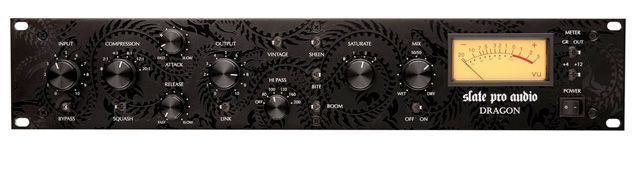
 You may have already heard of the Dragon. Not surprisingly, it's one of the most successful pieces of gear of 2010... This compressor isn't just another unit "inspired by" or "emulating" the ubiquitous UA 1176. It's much more. The heart of this processor is based on FET-style compression, but from there, it offers a whole range of additional options and possibilities.
In Steven Slate's own words, "I love analog compression, and I wanted to create something versatile, with lots of options for manipulating the signal, in the style of the Distressor."
Why FET and not VCA? Very simple: "VCA has already been done, and I think FET compression is very musical, but there have been very few good designs since the 1176."
The Dragon offers the classic sound of this type of compression (including the 1176's well-known "all buttons" mode), but adds Jensen transformers on the input, a Class A output section, three tone-shaping options, a saturation stage, a high-pass filter... and a surprise or two more.
As the heading of the article put it, "Classic sound with innovative options."
Drums, Digital, Audio
Steven Slate is an American producer and mix engineer, widely known for his drum samples. For many years he prepared drum samples for other producers, and one fine day he decided to create his own library and sell it.
The result was Steven Slate Drums, a very popular library in the United States, where it has been used on numerous high-profile productions.
The library includes several dozen kicks, snares and toms, with different velocity layers, multisampling and a very punchy sound... In addition, the Z system (which offers the samples in four sets: "dry," "with ambience," "with lots of ambience" and "ambience only") makes the library very versatile.
The samples are offered in WAV as well as in Kontakt and GOG formats. The latter is the proprietary file format of the Drumagog plugin, which at the time the library was released was starting to gain ground on the popular Sound Replacer...
And since he was in direct contact with many users of these and other drum replacement plugins, Steven knew the strengths and weaknesses of many of them firsthand, and decided to create his own plugin. This gave rise to the company Slate Digital and its first plugin, Trigger.
Today, Slate Digital has two more plugins (FG-X Virtual Mastering Tool and The Virtual Console Collection), and has seen a third branch grow in the family: Slate Pro Audio, the company responsible for the Dragon.
Faceplate
Without a doubt, the first thing that catches your eye about the Dragon is the front panel design. It's not every day you find audio gear with tribal-style decoration... It seems that right from the start the company wanted to "break the rules," and it commissioned the faceplate design from a well-known New York artist and tattooist (Davey Suicide). (For less daring users there is an all-black version.)
The first control on the front panel is Input, which sets the level of the signal going into the unit. Since the compressor has a fixed Threshold, this knob also lets you set the amount of compression applied.
Below it is the Bypass switch. All of the Dragon's switches are operated from left to right, being off on the left and on on the right. At this point, it wouldn't have hurt to put an On/Off label next to each one; their absence is a bit confusing at first.
The compression ratio can be selected from 0, 2:1, 4:1, 8:1 and 20:1. Position 0 means 1:1 compression (that is, no compression) and lets you use the unit to add some color to the signal, whether from the sound of the transformers, the various tone-shaping stages, saturation, etc.
Below the ratio selector there is another switch called "Squash" which, when the 20:1 ratio is selected, simulates the 1176's "all-buttons" effect.
For those who aren't familiar with it, this UA 1176 mode consisted of pressing all four ratio buttons at once to compress mercilessly and bring any signal to life. If you have an emulation of this compressor (such as Pro Tools' BF76), try clicking any of the ratios while holding down the Shift key.
The Squash option sounds very good, and the Dragon also has the particularity of letting you use it with any compression ratio. In other words, this switch can be engaged at 2:1, 4:1, etc.
Since the effect is more subtle at these other ratios, Squash mode can be used in many more situations than the original. As we said at the start, Dragon = Options.
Next come the Attack and Release controls, which offer a range of 20 to 800 microseconds for attack, and 50 milliseconds to 1.1 seconds for release.
Next to them, the Output control sets the signal's output level, and the Link switch lets you use two Dragons in stereo.
For this, a TRS jack on the back links the two Dragons. As a curiosity and an extra option, if you engage the Link control without two Dragons connected, the compression ratios are halved; that is, the compressor goes up to 10:1 at most.
The next knob on the front panel controls a high-pass filter acting on the sidechain signal, which can be set to 80, 100, 120, 160 and 200 Hz.
This keeps the compressor from responding so much to low frequencies, which is useful if, for example, you want to compress a mix or the entire drum bus but don't want the kick level to affect the compression of the other elements.
So far, this is the description of a compressor that's already pretty good on its own... However, the Dragon's options have only just begun.
More options
To the right of the high-pass filter are the tone-shaping controls or, as the manual calls them, "character" controls: Sheen, Bite and Boom.
Each of them affects the way the compressor behaves, effectively acting as a kind of EQ:
Sheen gives a signal with more "shine"; the manufacturer says it acts around 12 kHz. Bite provides a more "aggressive" signal by boosting the upper mids (no frequency band is specified), and Boom generates subharmonics at 50 Hz.
Each one can be engaged separately or together, and it must be said that they are all very useful.
Sheen works very well on vocals and overheads, for example, adding that shine without bringing out sibilance or "harsh" highs. Bite lets you give back to the signal some of the punch that can be lost when compressing with fast attacks (useful on guitars, snare, etc.), and Boom adds subtle but clear weight to kicks and basses, for example.
The next stage the signal encounters is saturation, which offers three positions, ranging from a subtle saturation effect in position 1 to clear distortion in position 3. Of course, it can also be turned off (position zero).
And finally (or almost), the Dragon offers a Dry/Wet control, which lets you blend some of the original signal with the compressed one, for parallel compression without any additional routing.
This control can be set anywhere between 100% wet and 100% dry, and has a switch to disable it completely (and thus go to 100% wet), which is very useful for comparisons.
Next to them is the VU meter, with a switch to select whether it measures the output level or the amount of compression, and another one to change the reference level (+4/+12).
And we said "or almost" because, along with all the options described so far, the Dragon has one more ace up its sleeve: Vintage mode.
When this mode is engaged, the Dragon switches to circuitry that emulates the behavior of certain vintage compressors, providing more harmonics and a generally more aggressive character.
Of course, the rest of the controls remain active and let you adjust the compressor's behavior in this mode, so you could almost say you get two compressors for the price of one.
In fact, in Vintage mode, the Dragon is especially sensitive to small changes in the time constants (attack and release), so it's worth exploring the different possibilities on offer.
Presets
With so many possible options, Slate Pro Audio did very well to accompany the Dragon with a good number of presets (available in the user manual), which illustrate many of the sounds that can be achieved with the unit.
These presets suggest various settings for kick, snare, full drum kit, bass, guitars, vocals, stereo mix, etc. If you want to hear them all, you can do so at http://www.slateproaudio.com/Audio_Demos.html.
Just in case there's any doubt, we should clarify that the presets are instructions on how to set the Dragon's various parameters by hand; it's not a digital system that sets them automatically.
In action
Saying that the Dragon excelled at practically everything we asked of it may sound like an exaggeration, but that's really how it was.
As you'd expect, given its father, this compressor is spectacular on drum elements. On both kick and snare, the Dragon lets you work the signal in many ways... all the ways imaginable with a compressor, and many more thanks to the saturation stage, character controls, vintage mode, Dry/Wet balance, etc.
As for the latter, it's extremely useful. All you have to do is run the signal through the Dragon, set the parameters to get a good dose of compression, and engage the control to blend in some of the original signal and fine-tune the effect perfectly.
Parallel compression is nothing new (and this isn't the first hardware compressor to offer it), but having it on board is a real winner.
The unit also excelled on other instruments, from acoustic guitars to vocals, as well as basses and electric guitars.
The tone controls deserve a special mention; they all sound very good and can be engaged independently or simultaneously... Boom on bass is a "must hear."
It's a shame we didn't have two units to check out the Dragon's stereo virtues firsthand, but we can say that, from what we've been able to find out, this unit has a lot to say in stereo, even on full mixes...
Overall, and to sum up, a truly powerful compressor.


