
LD Systems on UHF. Those of us who regularly devour ISP are already aware of the expansion of the LD Systems catalog, in which this growing company presents quite a few of its most recent creations. I myself have had the chance to put some of this company's products through their paces on the test bench, something the rest of you ISP readers already know about. One of those tests (ISP No. 94) dealt, among other things, with a wireless (radio-frequency) IN-EAR monitoring system that LD Systems called the MEI 100. Today we take on its big brother.
Unboxing
Like the MEI 100 before it, the MEI 1000 comes in a rigid ABS carrying case with suitable (injected foam) padding inside, offering effective protection for its contents and easy portability. Those contents include the following items:
The LD MEI 1000 T transmitter
A transmitting antenna
A power supply
The LD MEI 1000 BPR receiver
The in-ear earphones (in a nice pouch) for the receiver, plus a couple of different sets of rubber adapter/isolation tips
A set of brackets with the corresponding screws (mounting kit) for mounting the transmitter in a rack, where it will take up one rack unit.
A feed-through adapter for connecting the transmitting antenna on the front of the rack.
A patch cable for that adapter.
A pair of alkaline batteries (depending on their quality, they can last more than 13 hours) for the receiver
 Transmitting
The MEI 1000 T, responsible for stereo FM modulation/transmission (UHF band), has the adjustment and control elements described below on its front panel. Looking at it from left to right, we first have a headphone jack with its own level control so the engineer can monitor the audio signal to be transmitted. Next comes an input level control for setting the level of the audio signal being transmitted, followed by the LCD screen where we can clearly and reliably check that the transmitter is operating correctly. For the various settings, both frequency and transmission mode, there are three buttons (SET, UP and DOWN) to the right of that small screen, and finally the power on/off switch.
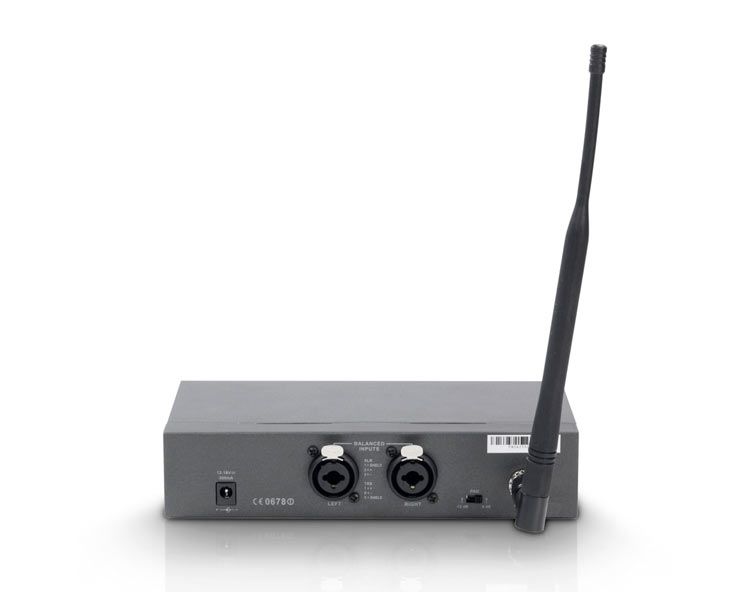
As for the rear panel, we find the connection for the power supply, a pair of XLR/jack combo connectors, both balanced, for the left and right channels (in principle), a switch (PAD) that lets us reduce the input signal by -12 dB, and the jack for the transmitting antenna (50 Ohms).
How to use it
Once the antenna, the audio signal input cables and finally the power supply are connected, we can switch the unit on. We press the SET button and we are at the first step of the setup menu, where we select whichever of the ten possible channel groups (GROUP SELECT) we want using the UP and/or DOWN keys; another press of SET and the cursor moves to CHANNEL SELECT, where again with UP/DOWN we choose the transmission channel we like between 1 and 16. Once this is done, the display shows us the tuned frequency in MHz corresponding to the chosen channel. In other words, this IN-EAR monitoring system has 160 channels distributed in ten groups of 16 channels each. The manufacturer recommends using the same group when working with several transmitters, provided of course that there are no more than 16 of them, which would force us to bring another channel group into play.
At the third cursor step, we have the selection of the unit's operating mode, something I discuss a little further on. The next setting lets us lock the system settings (LOCK SELECT) to prevent accidental tampering; actually, before this step the cursor goes through another one called TUNE FRECUENY, which has no function on this unit (perhaps it's for future applications), so we simply skip it. Finally, with the EXIT SET UP option we leave the configuration menu. Something I noticed in this regard is that if, while inside this menu, we take more than a couple of seconds to press a button/key, the unit automatically exits editing; in other words, you don't really need to go through EXIT SET UP, since within a couple of seconds the unit does it all by itself, which is all the better. While we're at it, I should mention that this auto-exit function is not included on the receiver, where you have to complete the EXIT SET UP step. The MEI 1000 T is now ready to work.
The MEI 1000 T on air
Once the audio has been sent from the console or another source, when it reaches the transmitter, the proper audio signal (clean and not clipping) is monitored at the headphone output provided precisely for this purpose, and we set the level to be transmitted using the knob provided for that purpose (INPUT LEVEL; I set it at roughly the middle of its travel).
During testing, I found that with two or three segments lit on the level bar (shown on the display) the unit already works correctly, which keeps the modulating signal far from overdriving the UHF carrier. In any case, this is something that should never actually happen, because the MEI 1000 T includes a limiter (which can be switched on at will) that will spare us that trouble if need be; however, if we avoid triggering the limiter by optimizing the input level, so much the better.
The MEI 1000 BPR receiver
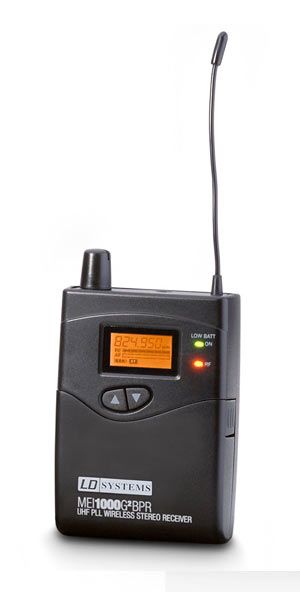
We assign the working group and channel on the receiver in the same way as we did on the transmitter. The buttons for going through the configuration steps (SET) and for exiting or escaping (ESC) are located inside, under a small front cover that flips open easily and also gives access to the battery compartment.
Its display shows: the group, the channel, the system lock, an eight-segment RF bar that tells us the radio-frequency level (field strength) being received, another eight-segment AF bar (placed parallel, just below the previous one) indicating the level of the received (demodulated) audio, the battery level on a four-segment bar, the reception mode, an indicator showing that the EQ is engaged (it provides a 6 dB boost at 10 kHz), and an indicator showing that the limiter is active (Limiter).
On its front panel we also have the UP/DOWN keys, an LED that tells us about a loss or drastic drop in carrier level (the manual mistakenly states that this LED indicates low battery), and another as a power indicator (POWER LED). On the top of this unit we find the volume knob with its power switch (ON/OFF SWITCH), the stereo (TRS) mini-jack for the earphones, and the small flexible receiving antenna.
The MEI 1000's trump card
Normally, reception on these devices allows for listening in either stereo or mono. The MEI 1000 goes further, since it also offers reception in FOCUS or DOUBLE MONO mode, a technical feature that is tremendously useful for potential users of IN-EAR monitors. In stereo mode (FOCUS MODE OFF; the display shows FO OFF) you can balance between channels (the display shows bAL) from the receiver itself, while in FOCUS mode (FOCUS ON; FO ON on the display) you get the extraordinary ability to create a personalized mix of the received signals. Let me explain.
On one transmitter channel we send, for example, a mix tailored to the performer's needs, while on the other we send only their voice or instrument. The artist can thus create an individual level mix (at their own discretion) of the two from their own receiver. They do this simply with the balance control, which in this case becomes more of a mix control for the two channels. I should point out that listening in this mode is in mono but, as I said, with the ability to blend the two received signals. The mix/balance control offers up to 15 steps in each direction (left/right). In FOCUS mode, it is with those same steps that we adjust the mix level between the received instruments or signals.
Important: To use the MEI 1000 in FOCUS mode, the transmitter must be set to its Stereo transmission mode.
Warning: risk of severe hearing loss. This receiver system with its in-ear earphones can reach such high listening levels (high sound pressure) that they become intolerable; be careful with the volume control.
Since stereo transmission/listening requires two channels, which will normally be two mixes and their corresponding aux sends, and since FOCUS mode would require the same (even though listening would be on two mono channels), it occurred to me to test the following: I connected an aux mix/send to one transmitter input, while to the other I connected the signal of an instrument (in my case, the bass guitar), but via the direct output on its console channel. All I'll say is that, just as I had imagined, this configuration worked; this is the way to operate in FOCUS mode and save ourselves an aux bus.
Everything I have described so far may give the impression (on paper) of being complicated or convoluted; far from it, operating this system is extremely simple. I'd say a glance at the manual (almost unnecessary for you, the reader of these lines) and about ten minutes in front of an MEI 1000 are enough to have it all perfectly clear; after that, it's plain sailing.
Technical specifications of the LD MEI 1000 T transmitter
Frequency range. (*)
Standard version. 790.850 MHz to 813.800 MHz.
X version. 838.850 MHz to 861.800 MHz.
Number of channels. (*) 160
Transition bandwidth. (*) 25 kHz.
Modulation. Wideband stereo FM.
Transmission power. 10 dBm (10 mW).
Spurious rejection. More than 50 dBc.
Peak deviation. (*) +/- 40 kHz.
Frequency response. (*) 60 Hz to 16 kHz.
Signal-to-noise ratio. 85 dB (A-weighted).
T.H.D. (*) Less than 1%
Maximum input level. 20 dBV.
Supply voltage. Between 12 and 18 V DC / 300 mA.
Notes:
*= means the receiver has the same specification.
dBc: Level in decibels relative to the carrier.
T.H.D.: Total harmonic distortion.
Total Harmonic Distortion.
Technical specifications of the LD MEI 1000 BPR receiver
Demodulation. Wideband stereo FM.
Crosstalk. Better than 42 dB.
Sensitivity. About -94 dBm for a 30 dB signal-to-noise ratio.
Signal-to-noise ratio. More than 80 dB (A-weighted).
Dynamic range More than 95 dB.
Output power. 100 mW.
Power supply. 3 Volts DC (2 x 1.5 V AA batteries).
Battery life. More than 13 hours.
Size. 90 x 65 x 24 mm.
Weight. 90 g


